VidHex — Enhance video quality with AI
 Enhance video details and clarity with AI technology and get stunning, high-quality video in any scenario.

Free no‑watermark AI video upscalers restore detail for blurry or old footage, though online options often impose file‑size and feature restrictions. Desktop tools like VidHex support batch processing and upscaling up to 8K without watermarks, while web‑based picks such as Vmake and Clideo offer instant access yet rely on credits or come with processing downsides. HitPaw VikPea delivers color correction for casual projects but demands decent device performance, and Topaz Video Upscaler provides multiple AI models for film restoration, requiring powerful GPU hardware with limited free‑version features. For watermark‑free results, import your clip in VidHex, select an enhancement model, set your target resolution and export the upgraded file directly.
5 Free Video Upscaler Tools: Overview & Comparison Guide
Quick Answers:
Dealing with a low-quality video can be annoying and sometimes keeps us from fully immersing ourselves in the video playback experience. As there is a high concentration of AI tools claiming to be free video upscalers no watermark on the web, only a few work and produce real results. This guide will look into five capable and safe-to-use AI video upscaler tools and give general steps in how to upscale a video.

Contents:
How We Test and Review
In searching for the best and ultimate free AI video upscalers with no watermark for users' convenience,e we browse the web and actually use a variety of tools, and thus come up with five different yet functional and straightforward AI video upscalers that all types of users can easily use for their video enhancement needs. Thus, our thought process in selecting the following tools is based on the following principles we adhere to.
• Accessible. We checked and ensured that the listed tools in this guide are easy for users to access regardless of the device they're using, have a straightforward user interface, and are lightweight and easy to install.
• Performance. We ensure that the AI video upscaler tools deliver high-quality, lossless video upscaling. Thus, each tool has undergone actual testing for a period of time to check all possible features and functions for upscaling videos.
Part 1. Top 5 Free Video Upscalers Without Watermarks
VidHex AI Video Upscaler
Best For: Multipurpose AI Video Enhancer & Upscaler Tool
Ratings: 4.8 / 5
VidHex AI Video Upscaler is a type of video upscaler tool that offers free use and access to a variety of AI tools for enhancing and improving video quality without hidden charges or forced account login. It has a convenient, straightforward user interface and a lightweight design that runs easily on desktop devices, making it easy to process videos without issues. This tool can batch-upscale multiple videos, integrates modern techniques for upscaling and recovering details, and supports a wide range of video file formats for convenient use and compatibility.

Pros
- Free-to-use tool.
- Doesn’t put a watermark on the videos.
- Lightweight on the user device.
- AI-powered video upscaler.
- Easy-to-use tool.
- Houses a variety of video enhancers and upscaling functions.
- Fast processing video upscaler tool.
- Customizable resolution output.
Cons
- The processing speed may take some time, especially with longer videos with higher quality.
Vmake
Best For: Web-based Free Video Upscaler Tool
Ratings: 4.1 / 5
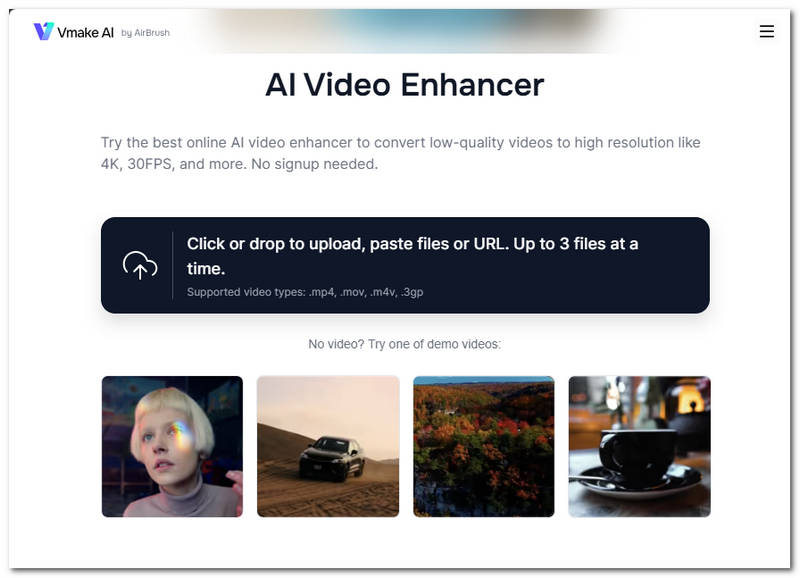
Vmake AI Video Enhancer is a tool that allows users to load low-quality videos and perform the upscaling almost instantly, as it is powered by an AI that analyzes the frames of the video and upscales the area that needs it. The tool can upscale any video from HD up to 4K and has effectively shown image and video capabilities thanks to its AI that handles all the work.
Pros
- Instantaneous and accessible video upscaler tool.
- User-friendly tool.
- Powerful video upscaling capabilities.
Cons
- It lacks other features and functions needed for video upscaling needs.
- It uses a credit-based system for upscaling videos.
Clideo
Best For: Straight-up Web-Based Video Enhancer & Editor
Ratings: 3.5 / 5
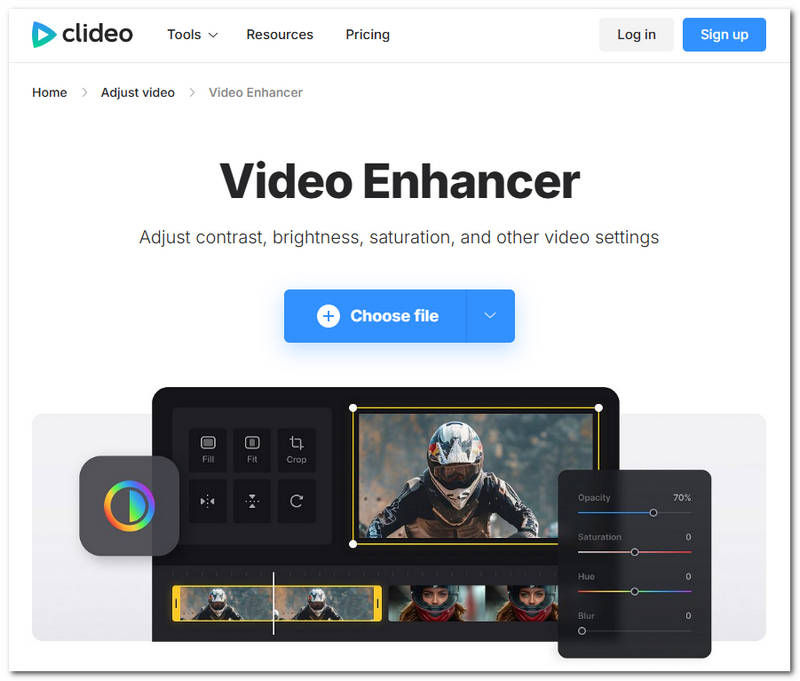
Clideo Video Enhancer is also a type of video upscaler tool for web-based use that gives a more straightforward AI video upscaler tool. Similar to Vmake, it is also powered by an AI that automatically adjusts the video contrast, brightness and saturation to achieve a high-resolution effect on the video. In addition, it can double as a video editor as it has basic video tools that can allow users to refine the video further through their manual input to upscale or enhance the video on the webpage.
Pros
- It has a very clean and minimalistic user interface design.
- Easy to use for novices and non-tech-savvy users.
- It is a cloud-based video upscaler tool.
Cons
- It has a video upload file size limit.
- It can become unacceptably slower over the course of processing a video and with multiple continuous uses.
HitPaw VikPea
Best For: Multi-Platform AI-Powered Video Upscaler Tool
Ratings: 4.5 / 5
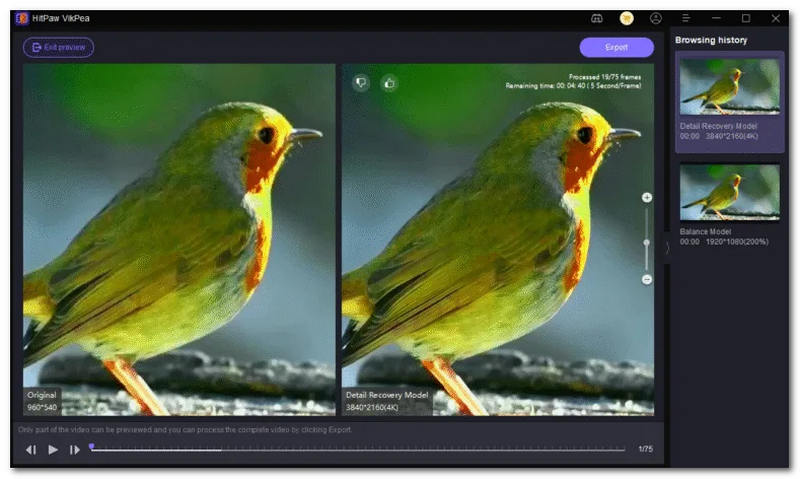
VikPea by HitPaw allows users to upscale any type of video of poor resolution to 4K quality by utilizing AI that allows the tool to generate new pixels, making the videos a lot more vibrant and crisp in quality. Moreover, it can also upscale grainy and almost washed-out color videos, as it has a color correction function, making the upscaling process focus more on enhancing the video color and quality at the same time.
Pros
- Multi-platform AI video upscaler tool.
- Easy-to-use video upscaler tool.
- It features color correction and AI restoration.
- Produces ultra-smooth video motion.
- Capable of batch processing videos.
Cons
- It is not lightweight on the user device.
- May perform poorly with entry-level devices, which affects the overall performance of the video upscaling.
- It has a limited free trial period.
Topaz Video Upscaler
Best For: Access to multiple AI Video Upscaling Models
Ratings: 4 / 5
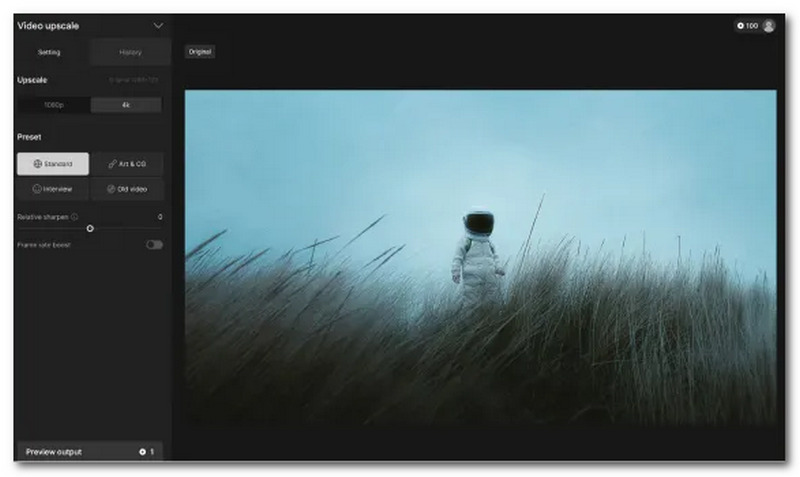
Another capable AI-powered video upscaling tool, Topaz Video Upscaler helps in turning low-resolution video footage back to its original quality by automatically analyzing and going through the video frame-by-frame to reconstruct details and colors, all thanks to the AI that is integrated.
Pros
- Powerful AI video upscaling capabilities.
- Wide range of AI models to use.
- AI-powered video upscaler tool.
- Supports batch processing of videos.
Cons
- Subscription-based AI video upscaler tool.
- Limited features and functionality when using the free version.
- Requires a powerful GPU device to run smoothly.
Part 2. Comparison Summary: Which Tool Should You Choose?
As YouTube deals with long-form and short-form videos, one video resolution and aspect ratio in the YouTube context often mistakenly get mixed up. Thus, in this section, we will differentiate the two terminologies.
When you can’t decide which tool to use for your video upscaling needs, in this section we prepare a comparison summary chart of the listed tools to help you further understand the capabilities of each tool in various categories. While this is just some basic information about the tool, it can help you identify your priority or need in an AI video upscaler;r thus, feel free to try them all for a more personal and thorough inspection of each tool's capabilities.
| Tools | Free to Use? | Platforms Availability | Resolution Size Support | Use Case | Watermark |
|---|---|---|---|---|---|
| VidHex | Free (no-watermark basic) + paid plans | Windows & Mac | Up to 8K video upscaling | Professional & Casual Creator Use | ❌ |
| Vmake | $99+/yr or one-time perpetual license (~$299) | Web-Based | Up to 4K video upscaling | AI-Based Video and Image Enhancer | ❌ |
| Vmake | $99+/yr or one-time perpetual license (~$299) | Web-Based | Up to 4K video upscaling | AI-Based Video and Image Enhancer | ❌ |
| Clideo | Credit-based | Web-Based | Up to 1080p and 4K video upscaling | Quick Online Video Upscaling | ⚠️ Watermark on free tier |
| HitPaw | Credit-based | Desktop & Web-based | Up to 4K video upscaling | Casual Editors & Personal Projects | ⚠️ Watermark on free tier |
| Topaz | Free trial (limited)< subscription or one-time purchase | Desktop & Web-based | Up to 8K video upscaling | Film Restoration | ❌ |
Our Hands‑On Test:
We ran a controlled visual‑quality test using identical 720p source footage, upscaling each clip toward 4K with every tool’s default‑recommended AI model. Visual results were scored on a 5‑point scale focusing on detail restoration, noise handling, artifact generation and natural‑looking textures.
VidHex: 4.7/5. Produced sharp natural details with few over‑processing artifacts; noise suppression performed well without smearing fine textures.
Topaz Video Upscaler: 4.6/5. Delivered the finest detail reconstruction overall; textures stayed authentic, though it occasionally introduced minor unnatural smoothing on noisy segments.
HitPaw VikPea: 3.8/5. Solid sharpening effect, yet some fine‑grain textures became over‑smoothed; occasional faint AI‑generated artifacts appeared in high‑motion frames.
Vmake: 3.2/5. Noticeable improvement over original 720p, but fine details were soft; visible artificial halos around object edges on complex scenes.
Clideo: 2.8/5. Basic sharpening was present, yet real detail recovery was limited. The output looked somewhat washed‑out compared against other AI‑driven results.
While scores reflect visual observation only and exclude render‑time and bitrate metrics, they illustrate relative real‑world performance you can expect under default settings. Web‑based tools Vmake and Clideo lag behind desktop‑native solutions for demanding footage.
Part 3. How to Upscale A Video to 4K/1080p for Free Without A Watermark
To demonstrate the general process of how AI video upscaler tools work, in this section we used the VidHex AI Video Upscaler tool as an example and to step-by-step teach users how to upscale a video in 4K on their own without any watermark on the video. Thus, feel free to use your preferred AI video upscaler tool or simply use VidHex and follow our simplified steps below for effective video upscaling.
Step 1. Download and install the VidHex AI Video Upscaler to your desktop device (Windows or Mac).
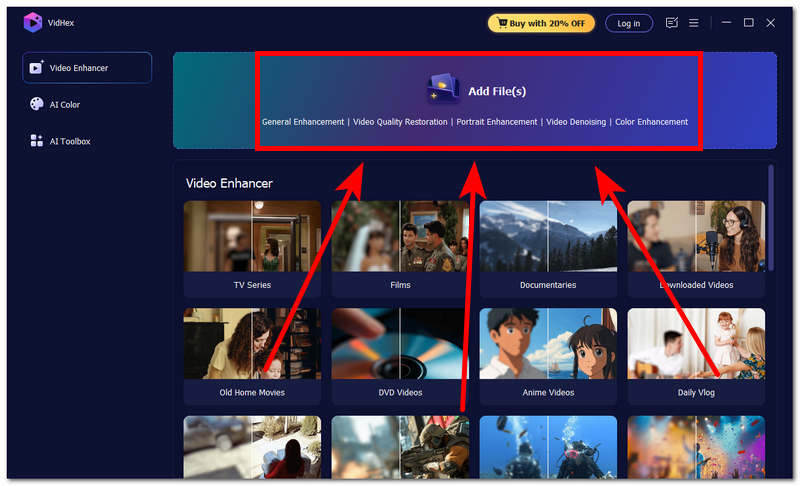
Step 2. Open the VidHex software on your desktop device and, from its main interface, simply click the Add File(s) button and browse your desktop device to load your video into the software.
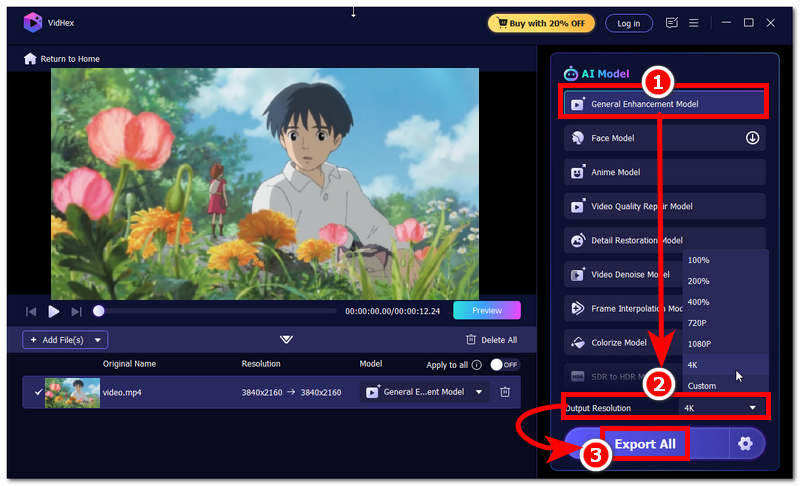
Step 3. Once you have uploaded your video into the tool, click on the General Enhancement Model in VidHex; then change the output resolution to 4K or your preferred resolution.
Step 4. Finally, click the Export All button to export your video to your desktop device's designated folder.
Part 4. FAQs about Free Video Upscalers Without Watermarks
Can free AI video upscalers improve old or blurry videos?
Yes, an AI-powered video upscaler tool, especially those that are listed in this guide can ultimately helps in improving or recover the missing details and quality in a video as it uses AI in away that it analyzes the frames of the video and automatically process the frames in recovering the colors and details in them, thus giving the video a more high quality effect similar to what a high resolution video contains.
Is there a limit when using free online video upscalers?
Yes, compared to software-based AI video upscaler tools, the wesed one we used has limitations in the offered tools and available upscaling options, as well as limitations on the file size of the video.
Conclusion
The use of a free AI video upscaler comes in handy, especially when users want to save old video footage of themselves, whether for a personal project or professional use. Upscaling a video can indeed save time in general. However, in choosing a video uspcaler tool users need to be careful as not every tool offers a genuine video upscaling capabilities and that’s why this article some into the scene to help out users whether first time user or in need of video upsler tool to upscale their videos in a more comparison review which listed all the possible pros and cons of each tool for users to know and manage their expectations before using the tools in this guide.

- Upscale videos to 4K/8K with AI.
- Increase FPS for smoother videos.
- Colorize B&W old recordings.
- Brighten the low-lit footage.
- Remove noise with details retained.