AI Face Model Enhances Face Features Naturally

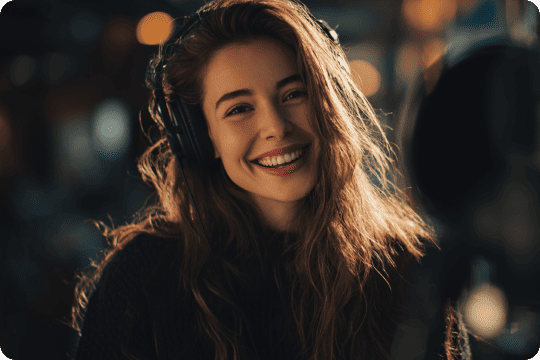
The built-in AI Face Model can optimize facial features in a natural way without creating an artificial look. It preserves key details such as eyes, skin texture, and contours while refining the overall appearance. With it, blemishes are gently smoothed, noise is reduced, and missing details are restored, subtly improving skin tone. As a result, enhanced faces look more beautiful and natural.

Buy Now

Buy Now

30-Day Money Back Guarantee

1080p/4K Resolution Clears Video’s Faces

VidHex can upscale videos with faces to 1080p/4K/8K, and automatically repair damaged pixels on faces. This can make every face in your videos look clearer with sharper edges, refined texture, and more details. No matter if the face is blurry, noisy, or backlit, VidHex AI Face Enhancer can improve it to present a crystal-like visual effect.

Buy Now

Buy Now

30-Day Money Back Guarantee

Color Tech Improves Low-lit Faces to Be Brighter

With AI facial color optimization, faces in your videos will become brighter and cleaner. This system automatically corrects dull, uneven, or washed-out tones while preserving realistic gradients and lighting effects. Even in low-lit footage, VidHex face enhancement can improve backlit/side-lit faces, increase brightness where needed, and balance shadows to deliver more vibrant skin tones.

Buy Now

Buy Now

30-Day Money Back Guarantee

More Key Benefits of VidHex Face Enhancer

Frame Interpolation

A stable face enhancement during motion, without flickering or shaking.

Colorize B&W Faces

Bring the characters in old family videos/films back to life with colors.

Remove Noise

Reduce facial artifacts in your videos to achieve a clean skin texture.

Easy to Use

Intuitive navigation helps you enhance faces with AI in just three steps.

Batch Processing

One click to enhance videos with faces in bundles efficiently.

Support Preview

Preview face enhancement results before exporting the videos.

What Videos Can VidHex Handle

Old Home Recordings

Old Home Recordings

Close-up Clips in Films

Close-up Clips in Films

Person Interview Materials

Person Interview Materials

Night & Low-light Footage

Night & Low-light Footage

Individual Daily Vlogs

Individual Daily Vlogs

Who is VidHex Face Enhancer Best for?

Nostalgic Video Enthusiasts

Nostalgic Video Enthusiasts

Video Creators & Editors

Video Creators & Editors

Short Video Bloggers

Short Video Bloggers

Surveillance & Security Workers

Surveillance & Security Workers

Individual & Family Users

Individual & Family Users

How to Use VidHex Face Enhancer

01

Import Your Video

Launch VidHex and drag your footage file into the interface. Or you can hit the Add File(s) button.

02

Select an AI Model

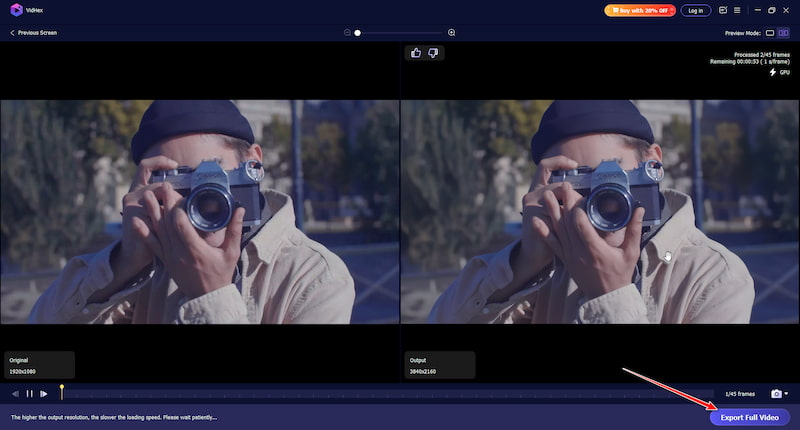
Next, choose the Face Model. Then, you can click the Preview button to see the enhanced faces before exporting.

03

Export the Result

If you are happy with the result, click the Export Full Video button to save the enhanced video to your device.

VidHex Import VidHex Face Model VidHex Export

Buy Now

Buy Now

30-Day Money Back Guarantee

What do people say about VidHex?

Comment Decoration

VidHex made the faces in my old videos look so much clearer and smoother. The AI face enhancement looks natural, not fake at all. Really impressed. By the way, it is beginner-friendly with easy operation.

SophiaSophia Five star Rating
Comment Decoration

I used the VidHex face enhancer feature to fix blurry faces in my vlog footage. AI face model automatically sharpened the details and removed noise without over-beautifying. It’s a super helpful AI face fixer for me.

JenniferJennifer Five star Rating
Comment Decoration

The upscaling feature in VidHex is amazing. It turned my low-res clips into crisp HD videos, and enhanced the facial features of characters in videos.

OliviaOlivia Five star Rating
Comment Decoration

My indoor videos were always too dark. VidHex made my low-lit videos brighter and balanced its shadows, so everything looks clearer and more natural now.

LeoLeo Five star Rating
Comment Decoration

With just three clicks, VidHex improved the skin tones in my videos beautifully. Colors look richer and more realistic, especially in tricky lighting conditions. Thanks for bringing my footage to life!

KevinKevin Five star Rating

Frequently Asked Question

How does AI detect and enhance faces in a video?

AI face enhancement models first detect faces in each frame using computer vision techniques. The system then analyzes facial landmarks such as the eyes, nose, mouth, and skin texture. Based on this analysis, the model reconstructs missing or damaged details and applies targeted improvements only to the face, not the entire frame.

Can a face enhancer improve small or distant faces in a video?

It depends on the size and clarity of the face in the original footage. AI models work best when facial features are still somewhat visible. If a face is extremely small or heavily blurred, the tool may improve overall clarity but may not fully reconstruct detailed features.

Does face enhancement affect the rest of the video?

Most AI face enhancers focus only on the detected facial regions. The background, objects, and other elements of the frame usually remain unchanged. This helps maintain the natural look of the original footage while improving facial details.

Can AI face enhancement help with old family videos?

Yes. Face enhancement is commonly used for restoring archival footage, such as old home videos, VHS recordings, or early digital camera clips. By sharpening facial features and correcting colors, the technology can make historical or personal footage look clearer on modern displays.

Success

Congratulations!

Thank you for subscribing! You've successfully joined our newsletter. Expect updates, offers, and insights delivered straight to your inbox.