


 VidHex — Enhance video quality with AI
 Upscale video to HD/4K with AI technology with no quality loss and enhance detail and sharpness.
Best Open-Source AI Video Upscalers for Linux in 2026

Whether you're restoring old family footage, upscaling anime to 4K, or enhancing security camera clips, AI-powered video upscalers on Linux have come a long way. But with so many open-source options out there, choosing the right one can be overwhelming — especially when hardware requirements vary wildly.
We tested three of the most popular open-source AI video upscalers Linux (Ubuntu 24.04, NVIDIA RTX 4060) and compared them head-to-head. Here's what we found — no fluff, just real results
Contents:
- How We Test These Video Upscalers for Linux
- Part 1. Quick Comparison of 3 Best Video Upscalers for Linux
- Part 2. Waifu2x Extension GUI: AI Video Upscaler for Anime & Cartoons
- Part 3. Real-ESRGAN: Best AI Upscaler for Real-World Videos on Linux
- Part 4. Video2x: Versatile Open-Source Video Upscaler for Linux
- Part 5. Bonus: The Best AI Video Upscaler for Windows/Mac
- FAQs about Linux AI Video Upscaler
How We Test These Video Upscalers for Linux
Test System
To evaluate the upscaling performance, we tested the software on the following setup:
Operating system: Ubuntu 24.04 LTS (Kernel 6.8) running on a Dell XPS 15
GPU: NVIDIA RTX 4060 Laptop GPU (8 GB VRAM)
CPU: Intel Core i7-13700H
Memory: 32 GB DDR5 RAM
Storage: NVMe SSDTest video: 3-minute 1080p H.264 clip (480 MB)
Upscaling target: 4K resolution (3840 × 2160)
Results:
Waifu2x Extension GUI (via Wine): 2 min 18 sec — Excellent anime upscaling, passable on real scenes. Minimal GUI issues under Wine.
Real-ESRGAN (RealESRGAN_x4plus): 4 min 52 sec — Best real-world detail recovery. Noticeable improvement in facial details and text.
Video2x (with RealESRGAN backend): 5 min 31 sec — Most flexible. Supports batch processing. Slightly slower due to pipeline overhead.
Part 1. Quick Comparison of 3 Best Video Upscalers for Linux
| Tool | Quality | Speed | GPU Needed? | Ease of Use | Best For | Platform |
|---|---|---|---|---|---|---|
| Waifu2x-Ext. GUI | Great (anime) | Fast | Yes (NVIDIA/AMD/Intel) | GUI, presets | Anime, cartoons | Win (Wine on Linux) |
| Real-ESRGAN | Excellent (real) | Slower | High VRAM | Command line | Real-world detail | Linux ✓ |
| Video2x | Flexible | Moderate | GPU recommended | Technical setup | Versatile use | Linux ✓ |
Part 2. Waifu2x Extension GUI: AI Video Upscaler for Anime & Cartoons
Best for: Anime and cartoon-style video upscaling. Great for fansubbing, archival anime restoration, and stylized content.
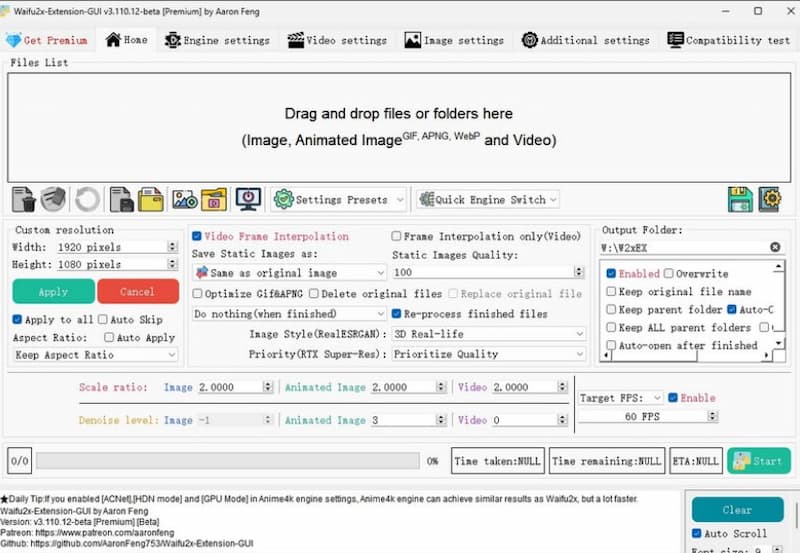
Waifu2x Extension GUI is a desktop application that integrates multiple AI upscalers, including waifu2x, Real-ESRGAN, and Anime4K, into a single graphical interface. Originally designed for anime-style images and videos, it now supports real-world content through additional model options. Its main selling point is zero command-line interaction required.
Note: Waifu2x Extension GUI is Windows-native. On Linux, it runs via Wine with reasonable stability. We tested on Ubuntu 24.04 with Wine 9.0 — GUI elements worked, GPU acceleration via Vulkan was functional.
Steps to Use Waifu2x
Step 1. Run the installation. Once completed, launch the application using the desktop shortcut or the Start Menu.
Step 2. Drag and drop your video file into the software, or click Add Files and choose an input.
Step 3. Select an AI model now. Then, set the output resolution multiplier. As an optional step, you can also apply denoising, frame interpolation, or artifact reduction.
Step 4. Click the Start button. The program will do everything automatically, including frame extraction, upscaling, video rebuilding, and audio synchronization.
Pros
- There are built-in video/audio muxing capabilities.
- Experienced users can take advantage of batch processing and complex settings.
- No Python or external dependencies are required.
Cons
- Processing can be time-consuming on low-end GPUs.
- Model selections and update frequency are dependent on developer maintenance.
- A little heavier installation.
Part 3. Real-ESRGAN: Best AI Upscaler for Real-World Videos on Linux
Best for: Real-world footage restoration — landscapes, faces, low-quality smartphone videos, and compressed streaming clips.
Real-ESRGAN is a free, open-source AI upscaling tool built with PyTorch and pre-trained GAN models. It helps improve low-quality images and videos by recovering lost details and reducing problems like noise and compression artifacts, especially in real-world content. With native Linux support and a Python/CLI-based workflow, Real-ESRGAN gives users more control over the upscaling process and is a popular option for those who prefer a customizable setup.
Steps in Using Real-Esrgan
Step 1. First, we need to prepare your video. Run FFmpeg to extract frames from your video.
ffmpeg -i input.mp4 frames/frame_%08d.png
Step 2. Upscale the video: Use Real-ESRGAN to improve the extracted frames. For 4x upscaling, use:
python inference_realesrgan.py -n RealESRGAN_x4plus -i frames --outscale 4
Step 3. Recombine the frames: Once upscaled, use FFmpeg to convert the frames back into a video:
python inference_realesrgan.py -n RealESRGAN_x4plus -i frames --outscale 4
Step 4. As an additional step, you can add the audio. To restore the original audio, run:
ffmpeg -i upscaled.mp4 -i input.mp4 -c copy -map 0:v:0 -map 1:a:0 final_output.mp4
Pros
- Superior image enhancement quality, particularly for real-world photos and movies.
- Multiple pre-trained models are available.
- Actively maintained and supported by a robust research team.
- Can be written or incorporated into custom video workflows.
Cons
- There is no built-in GUI; thus, you must use the command line or manually script it.
- Frame extraction and recombination are required for video utilization.
- Requires a Python environment and minimal knowledge of PyTorch.
- CPU processing can be slow; for real applications, a GPU is highly recommended.
Part 4. Video2x: Versatile Open-Source Video Upscaler for Linux
Best for: Users who want flexibility — supports multiple AI backends (waifu2x, SRMD, RealESRGAN, Anime4KCPP) and file formats.
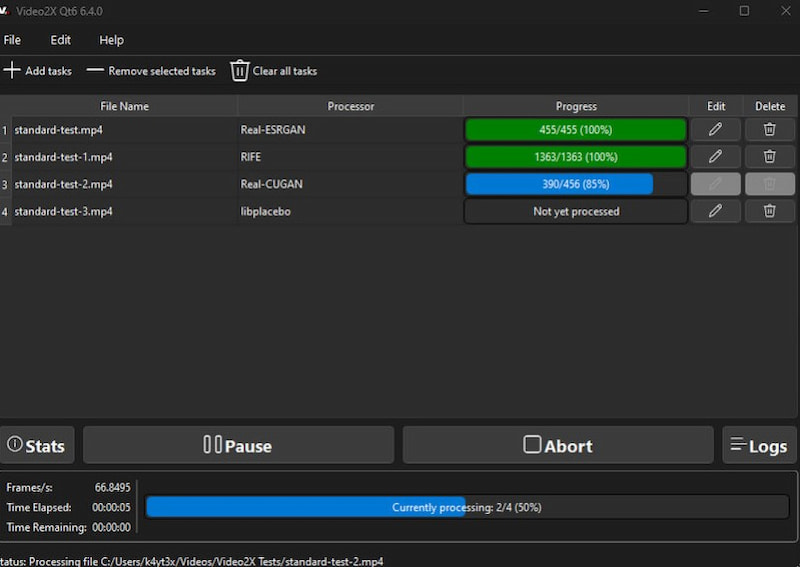
Video2X improves video quality by breaking the video into individual frames, applying AI upscaling to each frame, and then putting them back together into a higher-resolution video. It supports multiple AI backends, which gives users more options when working with different types of content, from anime to real-world footage. Although Linux setup may require some manual installation steps, it also gives advanced users greater control over the configuration and workflow.
The method includes numerous stages:
• Frame Extraction: First, Video2X splits the video into individual frames and an audio file using FFmpeg.
• Frame Upscaling: Each frame is then upscaled using one of the available AI models, such as waifu2x, SRMD, or Anime4KCPP. The upscaling models are adjustable, allowing users to select the one that best matches the genre of content (for example, anime versus real-life footage).
• Video Reconstruction: After processing the frames, FFmpeg reassembles the upscaled frames and original audio to create a final high-resolution video.
The procedure can be slow, especially when processing large videos or when GPU acceleration is unavailable.
Step 1. Build the project. To prepare your machine, refer to the official Video2X build guides for Windows and Linux.
Step 2. Get the most recent release from GitHub, or install the Qt6 GUI version for simpler use.
Step 3. Check the criteria. Make sure your CPU supports AVX2 and your GPU supports Vulkan.
Step 4. Run the application. Open Video2X, load your video, select an AI model such as RealESRGAN, establish options, and begin upscaling.
Pros
- Supports several AI backends to accommodate various sorts of material.
- Provides a Windows GUI that is easy to use for non-technical users.
- Batch processing is available for long films and entire folders.
- It is free and open-source, with no feature limits or watermarks.
Cons
- Processing is slow without GPU acceleration; an NVIDIA GPU is strongly recommended.
- Audio is not handled simultaneously with video and must be reattached individually.
- Installation and model configuration can be difficult for novices.
- Linux support is limited and requires manual configuration.
- This tool does not run natively on macOS.
Part 5. Bonus: The Best AI Video Upscaler for Windows/Mac
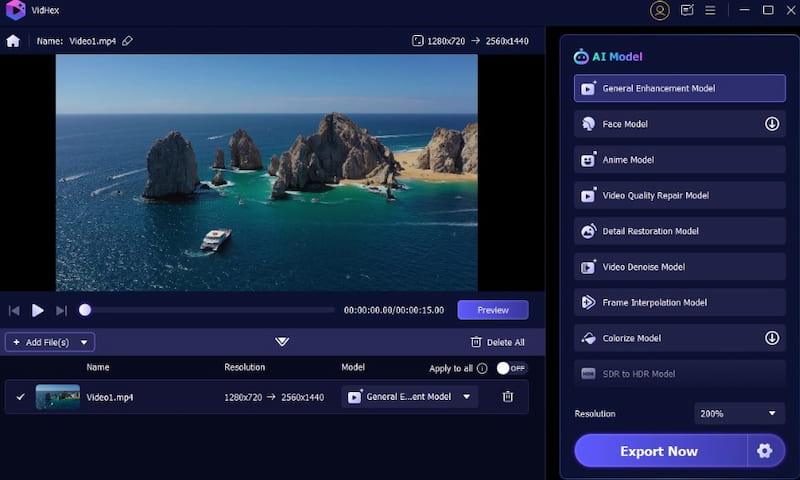
If you're working on systems other than Linux, the VidHex Video Upscaler is an excellent all-in-one solution for Windows and Mac. It streamlines the entire upscaling process with a straightforward interface and advanced AI algorithms. Unlike most open-source solutions that need technical processes, VidHex provides one-click enhancement without the need to extract frames or use command lines. You may submit any video, old footage, grainy clips, or low-resolution files- and it will quickly be upscaled to 4K with realistic detail retention.
Key Feature
• User-friendly and fully automated upscaling
• Supports 2x, 4x, and even 8x upscaling, with excellent detail recovery.
• AI-based noise and blur reduction
• Works perfectly on both Windows and macOS.
FAQs about Linux AI Video Upscaler
Can I run AI video upscalers on Linux without a dedicated GPU?
Yes, but expect very slow processing. Real-ESRGAN and Video2x can run on CPU with tiling enabled, but a GPU (NVIDIA recommended) is strongly preferred for practical use.
Which Linux distribution works best with these tools?
Ubuntu 22.04+ and Debian 12 are the best-supported due to extensive package availability. Arch Linux also works well but requires more manual configuration.
Is Real-ESRGAN compatible with AMD GPUs on Linux?
Yes. Real-ESRGAN can run on AMD GPUs through ROCm, AMD’s GPU computing platform. However, NVIDIA CUDA generally has better documentation and broader community support, so AMD users may need to spend more time on setup and troubleshooting.
What’s the difference between Waifu2x and Real-ESRGAN?
Waifu2x was created mainly for anime and cartoon-style images, using models trained specifically for that type of content. Real-ESRGAN uses a more general AI model that is better suited for real-world footage, including faces, photos, and scenes with text or complex details.
Can I use these tools on Windows or Mac?
Waifu2x Extension GUI runs natively on Windows. Real-ESRGAN and Video2x are cross-platform (Windows, Mac, Linux) if you set up the Python environment. For a simpler alternative, VidHex Video Upscaler offers a one-click GUI on Windows/Mac.
Conclusion
Linux users have access to powerful open-source AI video upscalers and enhancers — Waifu2x Extension GUI, Real-ESRGAN, and Video2x — each catering to different needs and skill levels.
Our recommendation: If you're restoring real-world video footage, go with Real-ESRGAN for the best quality. For anime content, Waifu2x gives excellent results with less effort. And if you want maximum flexibility, Video2x lets you mix and match backends for different projects.
For Windows/Mac users looking for a polished, all-in-one alternative, VidHex Video Upscaler delivers comparable quality with zero command-line hassle.

- Upscale videos to 4K/8K with AI.
- Increase FPS for smoother videos.
- Colorize B&W old recordings.
- Brighten the low-lit footage.
- Remove noise with details retained.


