


 VidHex — Enhance video quality with AI
VidHex: Best for beginners. Cloud-based without a GPU requirement. Offers upscale to 8K. Fast processing speeds (about 12min for 5min 720p clip).
Topaz Video AI 7: Best quality. A very expensive program that requires a strong GPU. Slowest of all (about 47min for same clip).
DaVinci Resolve 19: Offers AI Super Scale free of charge and will cost about $295 to permanently buy studio.
AVCLabs Video Enhancer AI: Best for anime and colorization. May create oil painting style artifact for live-action videos.
HitPaw VikPea: Fastest desktop application (about 8min). May create varying quality results for video with a lot of high-motion.
PowerDirector 365: Best for combining editing and enhancements. This software will offer editing with AI enhancements built-in. Will offer less effective AI tools than dedicated applications.
5 Best AI Video Enhancers of 2025: Pros & Cons
Tools at a glance:

Are you looking for an AI video enhancement tool to handle some low-resolution videos?
Compared to traditional editors, AI-powered enhancers can use advanced artificial intelligence to improve the overall quality quickly. They often automatically upscale resolution, reduce noise, sharpen edges, correct colors, improve clarity, and stabilize shaky footage. You can simply apply AI models to get related enhancements. With so many options available, which one is the best AI video enhancer? This post gives you five top contenders to choose from.
Contents:

| Tool | Best For | Output Resolution | Price Range | Processing Speed | GPU Required? |
|---|---|---|---|---|---|
| VidHex AI Video Enhancer | Beginners & casual users | Up to 8K | $31.92/mo | Fast with cloud accelerate | No |
| PowerDirector 365 | Professionals, high-end restoration | Up to 16K | $34.99/mo | Slow with local GPU | Yes |
| Topaz Video AI 7 | All-in-one video editing + AI | Up to 4K | $41/mo | Moderate | Recommended |
| AVCLabs Video Enhancer AI | Anime & colorization | Up to 8K | $39.95/mo | Moderate | Recommended |
| HitPaw VikPea | Quick one-click enhancement | Up to 4K | $42.99/mo | Fast | No |
| DaVinci Resolve 19 | Budget-conscious pros | Up to 4K | $295 | Fast | Recommended |
Part 1. Best AI Video Enhancer – VidHex
Best for: Beginners and people who prefer fast and hassle-free results to pixel perfect control. Video editors who want to enhance their work while editing.
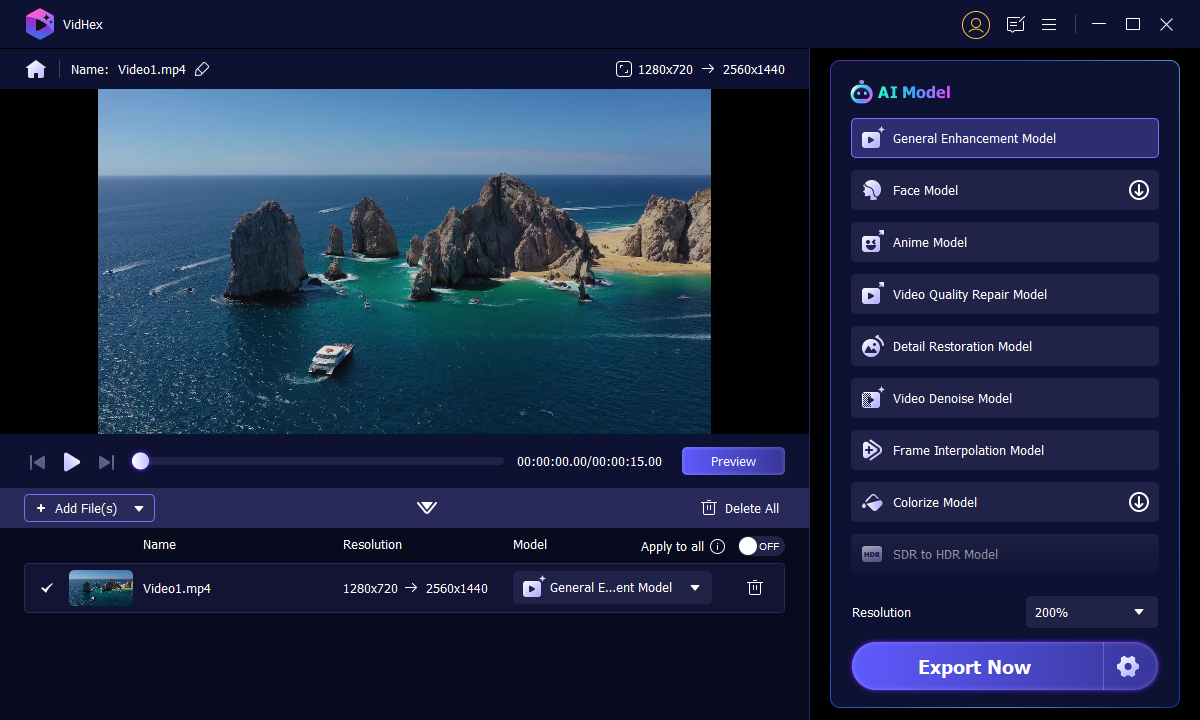
VidHex AI Video Enhancer is a popular, easy-to-use enhancement tool focused on upscaling. With the latest algorithm, it can easily increase video resolution (up to 8K) while adding details. This AI-powered video enhancement software provides multiple AI models for different purposes. VidHex allows you to enhance several videos efficiently. It leverages GPU acceleration for quicker generation of results. Moreover, you can preview enhancements before full processing.
• Offer various AI models to enhance all low-quality footage, like denoising, colorizing, upscaling, SDR to HDR converting, brightening, and more.
• Automatically balance brightness, contrast, and saturation during the enhancement process, which is friendly to beginners.
• Take your 720P or 1080P videos and upscale them to stunning 4K or even 8K resolution.
• Provide cloud acceleration to improve the processing efficiency. This can save you a lot of time.
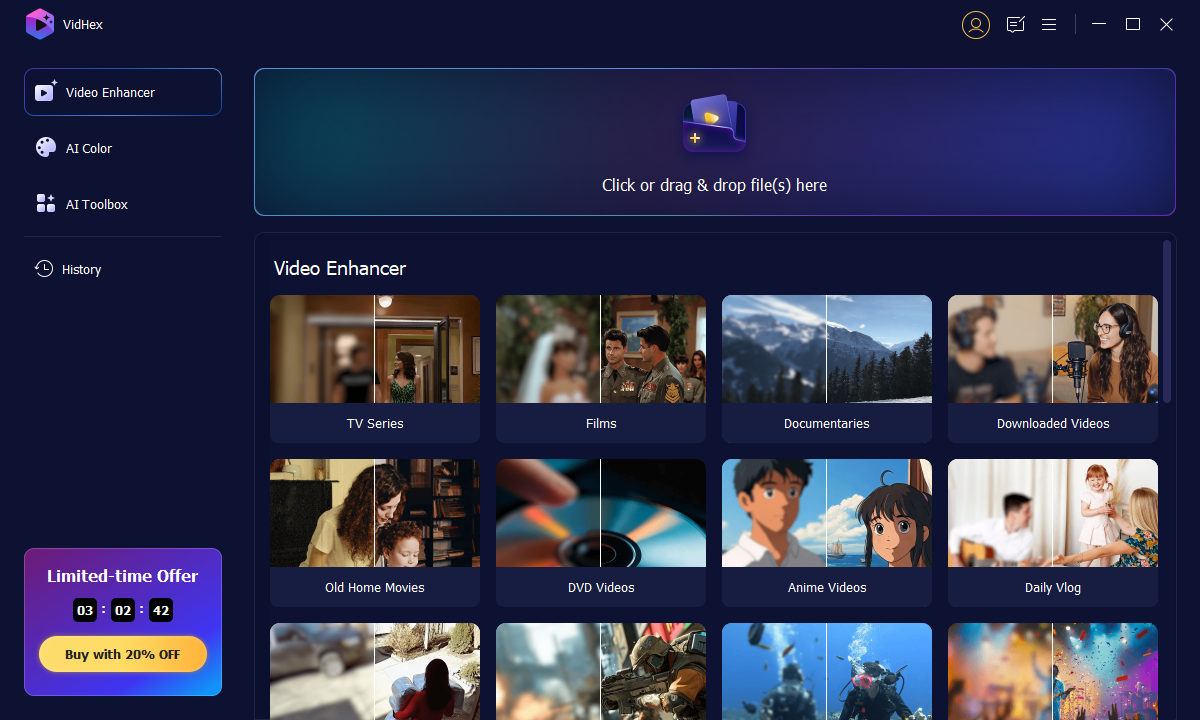
This program is very easy to use. You just need to import your footage into it and choose a proper AI model. Then, wait for the magic to happen. VidHex AI Video Enhancer is ideal for casual users and beginners to enhance the overall quality of their videos quickly.
Pros
- Comprehensive AI models than other products in the market.
- Support turning black & white footage into vivid colors.
- User-friendly for both beginners and professionals.
- Support up to 8K resolution output.
- Support cloud acceleration to save processing time.
- Support a great array of video format importing.
Cons
- The free version has limited functionality.
Part 2. PowerDirector 365 AI Video Editor
Best for: Content creators, educators, and budget-conscious filmmakers who need a fast, feature-rich video editor without a steep learning curve.
PowerDirector 365 is an all-in-one video editor with various AI-powered tools. It provides several core AI functions to upscale video clips, apply artistic effects, remove unwanted backgrounds, clean video and audio noises, attach graphics or text to moving objects, enhance quality, and more.

PowerDirector AI Video Editor offers necessary features to edit and enhance videos. It combines enhancement with various editing, effects, color grading, and conversion tools. Moreover, the reputable CyberLink actively develops and adds new AI features. But you should know that PowerDirector is not a dedicated AI enhancer. Its AI upscaling, denoising, and some other functions are generally less powerful than VieHex, Topaz, or AVCLabs. What’s worse, it requires an ongoing subscription to CyberLink Creative Pack or PowerDirector Ultimate to use related AI tools.
Pros
- Support relatively various AI editing tools.
- User-friendly interface design.
- Fast processing time.
Cons
- The number of options can be overwhelming at times.
- Expensive subscription plan. Some require a credit system that can run out, leading to extra costs.
- Some users report that certain AI features can be slow to process or not always yield perfect results.
Part 3. Topaz Labs Video AI 7
Best for: Professional users who require frame-by-frame restore quality and have adequate hardware for it.
Topaz Video AI is generally considered one of the best AI enhancement software to improve the overall video quality. As a professional and dedicated AI video enhancer, it provides numerous specialized AI models for specific tasks. You can select the target AI models to sharpen details, increase resolution, improve clarity, remove grain, add details, and more. That ensures efficient and high-quality results.

Video AI can often produce industry-leading results for upscaling common SD/HD videos to 4K/8K. While the upscaling process, this AI video enhancer will restore details, eliminate severe noise, and improve clarity. Compared with its competitors, Topaz Labs’ AI enhancer offers more sliders and settings for fine-tuning every aspect. The software is especially designed for difficult enhancements. As a dedicated enhancer, Video AI is very expensive. Moreover, it demands a powerful NVIDIA GPU and RAM/CPU to work smoothly.

Pros
- Good at restoring and enhancing details.
- Can upscale video resolutions like 4K, 8K, and even up to 16K.
- Support offline and batch processing.
Cons
- High GPU usage.
- Enhancing speed is very slow, especially for longer videos and higher resolutions.
- Achieving the best results often requires experimentation with different AI models, settings, and parameters, which is hard to learn.
- A relatively high subscription plan.
Part 4. AVCLabs Video Enhancer AI
Best for: Anime video creators and anyone working with black and white videos, that require dedicated AI models.
AVCLabs Video Enhancer AI is mainly used for upscaling. It can convert low-resolution videos to 4K or 8K with enhanced quality. This AI video enhancer is designed with various advanced features, including denoising, stabilization, deinterlacing, and colorization. Like VidHex AI Video Enhancer, it provides a dedicated AI model specifically for enhancing facial details and smoothing skin.

AVCLabs Video Enhancer AI supports batch processing. Besides, it ensures an efficient workflow with preview functionality. This AI-powered enhancer can deliver excellent output quality, particularly upscaling and noise reduction. However, the software also needs a good GPU for optimal performance. AVCLabs is not ideal for complex footage.
Pros
- Clean and intuitive interface.
- Its anime model and colorize model are outstanding.
- Flexible pricing.
Cons
- High system requirements with slow processing.
- The results can be artificial-looking. Some users have exported a “smudging effect” or “oil painting effect” in certain areas after enhancement.
- Lack of editing tools.
Part 5. HitPaw VikPea AI Video Enhancer
Best for: users that want fast results and satisfactory quality without requiring hardware upgrades, though not suitable for professional critical work.
HitPaw VikPea is another professional-grade AI video enhancer that carries distinct modes for different enhancement needs, such as general denoise, frame interpolation, stabilization, face enhancement, color calibration, animation, low-light enhancement, and more. HitPaw adopts the advanced cloud rendering and acceleration technology to guarantee a fast processing speed. It offers a one-click way to correct colors, improve low-light footage quality, restore details, sharpen edges, and improve resolution and clarity.

HitPaw AI video enhancer uses smart AI algorithms to output high-quality results. In most cases, you only need to select a model and let AI perform the enhancement. Moreover, it often processes quickly for common tasks like upscaling and noise reduction. Sometimes, the outputs of HitPaw VikPea may look over-processed or artificial. Compared to some dedicated AI video enhancement tools, it has limited advanced functions.
Pros
- Effective upscaling result.
- Frequently releases updates to add new features and improve existing AI models.
- Relatively affordable pricing.
Cons
- The trial version has limited features.
- Limited range of output settings.
- The output quality can vary depending on the original video’s quality and the specific content.
Part 6. DaVinci Resolve 19 – Best Free Option with Advanced AI
Best for: Budgets aware pros, students and users who need a pro NLE with competent built in AI enhancement capabilities.
Davinci Resolve 19 definitely needs a place on this list because not only does the free tier have actually good AI enhancement options, the program also runs on an incredibly well optimized engine allowing for 4K timelines on a fairly low powered machine.

Pros
- Free tier includes actually good Super Scale upscaling and a variety of Neural Engine tools.
- No subscription needed, just a one-off price of $295 for Studio
- Professional level color grading tools included as a standard part of the workflow.
- Highly optimized engine runs on many computers.
- Works on Windows, Mac, and Linux
Cons
- Not primarily a video enhancer, only a set of basic features compared to dedicated upscaler.
- A rather steep learning curve for those with no professional video editor experience.
- Only allows up to 4k output from upscaler, 8k is only available on the paid studio version.
- Needs at least a moderately competent GPU.
Which is the best AI Video Enhancer to use?
Given 7 tools available we can classify which one is better to choose based on your use case.
Are you a beginner or do you use them on a regular basis: For those you can rely on VidHex or HitPaw. They also have trial versions so that you can try it before purchasing them. The cloud-based solution on VidHex is interesting if you don't own a good PC.
Is the quality and not the cost the priority: Then Topaz Video AI is still the best on this market. Using a high-end NVIDIA GPU you'll have a very good rendering quality, perfect for the most demanding job.
Are you using Anime or colorizing it? Then AVCLabs with their dedicated models. This is your preferred choice for black and white colorization.
Are you seeking to enhance the image and to edit your video in the same time: Then PowerDirector 365 for Windows or DaVinci Resolve 19 if you prefer cross-platform tools.
Budget: Note that many free tools are also good enough such as HitPaw or even the free version of DaVinci Resolve for common task. Try this first, if it is not sufficient, invest in premium ones.
How We Test 6 Video Enhancers
Test machine: Desktop PC with Intel i7-13700K CPU, NVIDIA RTX 4070 graphics card with 12GB VRAM, 32GB of RAM, running Windows 11. A 2023 MacBook Air (M2 chip, 16GB) was also used to check web-based software performance cross platform.
Test footage:
- 480p extremely low bitrate clip (2 mins), VHS quality era.
- 720p compressed YouTube download clip (5 mins).
- 1080p gaming recording (3 mins), lots of motion involved.
- Black and white film clip (1 min) for colorizing testing.
Evaluation metrics: Clarity of output, artifacts within output, speed of processing, support for output resolutions, difficulty of use and price-to-performance ratio.
Part 7. FAQs of Best AI Video Enhancer
What is the best AI video enhancer?
As mentioned, many AI video enhancement tools are offered on the market, including free, online, and professional-grade ones. You should select the best AI video enhancer depending on your specific needs. Topaz Video AI, Adobe Premiere Pro, and AVCLabs Video Enhancer AI provide advanced AI models and can often generate high-quality results. However, these desktop programs are expensive and require a powerful GPU to work well. When you select the best AI video enhancer, you should also consider your budget and hardware. Moreover, the current AI models and video enhancers can’t perfectly handle all enhancements, especially for these complex tasks.
Can AI fix blurry videos?
Yes, there are specific AI models and tools specially designed to improve blurry videos. Many AI video enhancers have deblurring models to fix blurry parts, reduce compression artifacts or grain, sharpen details, and increase resolution. Moreover, they can intelligently add intermediate frames to smooth motion blur. AI-powered video enhancement tools like Topaz Video AI and VidHex can significantly enhance blurry videos, though they can't perform miracles.
Does Topaz Video AI have a free version?
Yes, Topaz Lab’s Video AI does offer a free version for you to have a trial and test its basic functions. When you reach the official product page of the current Video AI 7, you don’t have a specific button to download the trial version directly. Instead, you need to scroll down the page to the bottom part. Next to the Video AI 7 and Video AI Pro, you can see a Video AI Trial product. Click Try It and enter your email address to download it.
Do I need a strong GPU for AI video enhancement?
Depends on the software. Desktop applications like Topaz Video AI and AVCLabs are heavy on local GPU processing and a mid-range NVIDIA GPU or better is a must (RTX 3060 and above recommended). Cloud based applications like VidHex and Runway do the heavy lifting off-site, making them ideal for laptops and cheaper machines. Hybrid software, like HitPaw and PowerDirector, offer both local and cloud based options.
What is the difference between AI upscaling and traditional interpolation?
Traditional upscaling (bicubic, Lanczos) only stretches out your image and adds a blur/sharpen filter – it cannot add any new detail. AI upscaling intelligently interpolates and adds detail, generating a cleaner, sharper image with defined edges and realistic texture. It makes an incredible difference for lower quality sources.
Can AI video enhancers improve old or corrupted footage?
Yes, to a point. For VHS-quality or damaged scans of film, AI can reduce grain and noise, steady shaky frames, remove flicker and colorize the footage. Heavily damaged film (with scratches or warped tape) will still need significant manual repair. AVCLabs (for colorization) and Topaz (for stability and noise reduction) are good places to start when working with archived film.
Which AI video enhancers are the best for 4K or 8K upscaling?
For us, Topaz Video AI produces the best 4K/8K output quality out of all other tested software, particularly on highly compressed sources. VidHex and AVCLabs also allow 8K outputs, but still offer impressive results for most uses. Each software has its area to shine: Topaz for best quality, VidHex for speed and convenience, and AVCLabs for certain forms of media like anime.
Conclusion
You can get the five best AI video enhancer recommendations from this post. When you select the best one, you should figure out your specific needs, budget, and technical expertise. For instance, you should know if you need the absolute best quality, no matter the cost, or if you prefer a free video editor with decent AI enhancement functions. Professional enhancers often have requirements for hardware and come with a high price. Start with VidHex AI Video Enhancer or even some web-based tools if you are a beginner or casual user.
- Upscale videos to 4K/8K with AI.
- Increase FPS for smoother videos.
- Colorize B&W old recordings.
- Brighten the low-lit footage.
- Remove noise with details retained.


