


 VidHex — Enhance video quality with AI
 Enhance video details and clarity with AI technology and get stunning, high-quality video in any scenario.
AI Flixier Video Enhancer: Full Review & Alternative Tool

To produce the highest video quality, there is no longer a need to utilize a professional tool or have advanced knowledge or skills in video editing. As there are now multiple ways for a user to enhance video quality via a web-based or lightweight video enhancer tool, Flixier is among those AI-powered tools that exist to cater to video quality problems with ease. As we are now in the fast-paced content and video-producing world, it is just a matter of using a type of tool that instantaneously helps a user's video quality concerns. That’s why this guide uses this opportunity to conduct a Flixier review and check out what it is: an AI-powered video enhancer tool and how it differs from other competitive tools as a form of comparison guide to its alternative counterparts.
Contents:
Part 1. What to Check Before You Pick a Browser Video Enhancer?
When it comes to finding the best AI video enhancer tool that can ultimately assist you with your video enhancement needs, a user like you need to be sure and fully aware of what tools you are really looking for and need. Thus, in this section, we are going to help you realize what you should look for in a video enhancer tool, as there are a handful of tools available online; this could only help you filter out those unnecessary and fake tools in your hands.
• Usability. Consider choosing the tool that is accessible to your situation. Can the tool easily run on your device, and is it free, or does it give you seamless navigation to use the tool?
• Functionality. Think about what kind of video enhancement you need for your video; in this way, you can prioritize choosing a video enhancer tool that directly addresses your need. Thus, feel free to also choose a tool that offers a wide range of AI models for video enhancement.
Part 2. What is the Flixier Video Enhancer?
Flixier Video Enhancer is a web-based video enhancer tool that allows users to load their video file into the tool and perform video enhancement automatically up to 4K quality. This tool has a very straightforward user interface, allowing all kinds of users to navigate the tool without any problems. Furthermore, Flixier is a type of video enhancer tool developed for quick and instantaneous enhancement needs at a user-friendly cost, perfect for quickly fixing problems in the world of fast-paced video content creation.
Part 3. How to Enhance A Video with Flixier
Step 1. Head over to the Flixier Video Enhancer official website and, from their interface, proceed to upload a Video in the designated field.
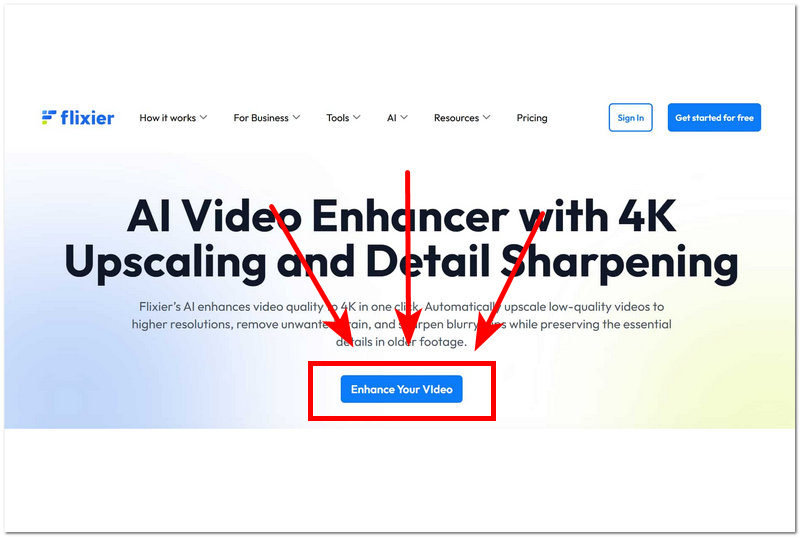
Step 2. After you choose the video file from your device that you wish to enhance using Flixier, it will proceed with uploading the video file into the tool. While it is uploading, the enhancement of the video is already taking place, leaving the user with no effort in enhancing their video file.
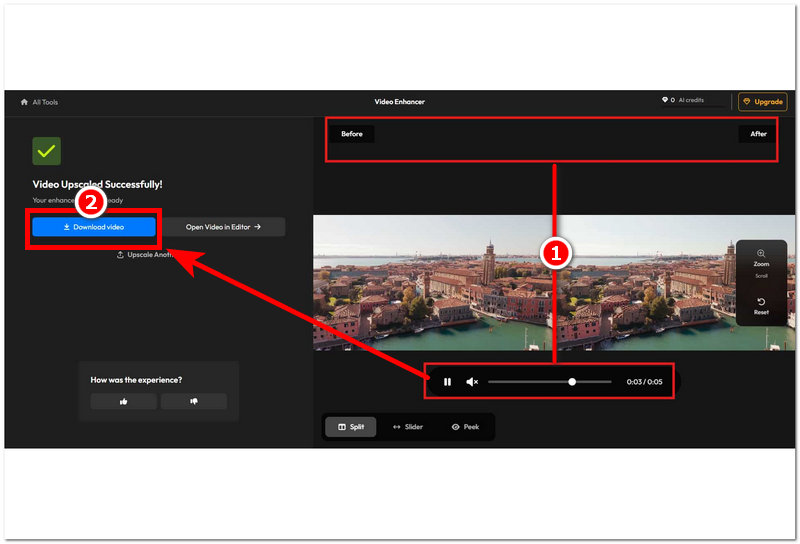
Step 3. Once the video is finished processing, you may review your video file and check if the video is enhanced. Once you are satisfied, proceed to click on the Download Video to save your enhanced video on your device.
Part 4. Flixier Video Enhancer Limitations
• It uses a credit-based system for enhancing a video file.
• It lacks user control for adjusting and modifying the strength of enhancement done to the video file.
• Not suitable for longer and larger video files.
• Dependent on a stable internet connection.
• It doesn’t perfectly reconstruct video frame interpolation for smoother video motion playback.
• It may struggle to enhance low-light videos.
Part 5. VidHex Video Enhancer
VidHex Video Enhancer is among those AI-powered tools that are on the rise, as it manages to house multiple AI models in addressing a wide range of video quality problems while maintaining its lightweight and user-friendly interface at the same time. VidHex is capable of enhancing video quality up to 8K resolution with promising restoration of video details, clarity, and color, all at the click of a button. Moreover, this tool is also a fast video processing enhancer tool, allowing users to have a more convenient use of video enhancement.
• Lightweight free video enhancer tool.
• Fast video processing enhancer tool.
• Supports 8K and customized video resolution export quality.
• Has tons of features and customization options for fine-tuning video files.
• Easy-to-use video enhancement and upscaling tool.
• AI-powered tool with multiple AI models for seamless video enhancement needs.
• It has automatic color correction functions.
How to Use the VidHex AI Video Enhancer Tool
Step 1. Download and install the VidHex AI Video Enhancer tool on your desktop device (Mac or Windows).
Step 2. Open the video enhance software on your device, and from its main interface, click on the Add Files field and select and load the video file you wish to enhancer using the software tool.
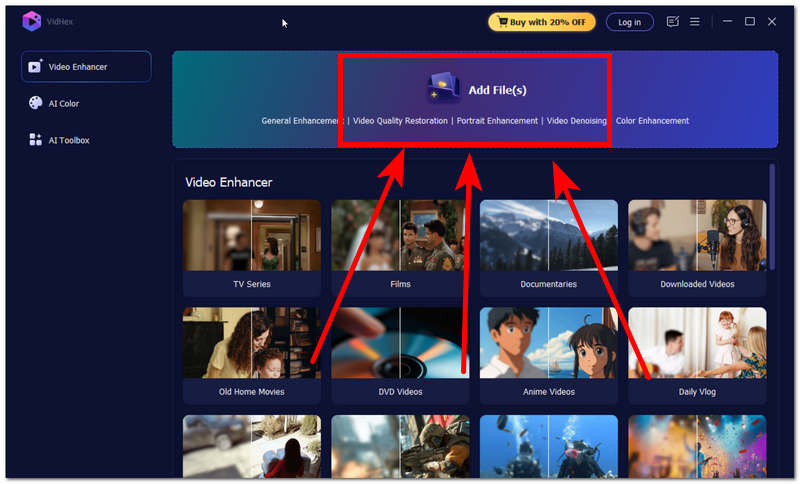
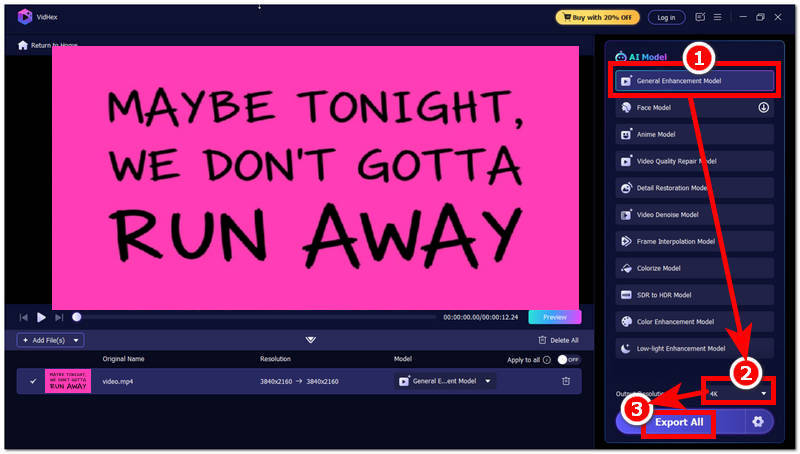
Step 3. Once the video file is loaded into the tool, proceed to click on the General Enhancement Model in the AI model list of the tool and head over to the Output Resolution situated in the lower part of the tool and set your resolution to 4K.
Step 4. After you have changed your Output Resolution size, proceed to click on the Export All button to have your video exported to your desktop device.
Quick Comparison Chart
| Flixier Video Enhancer | VS | VidHex Video Enhancer |
|---|---|---|
| Basic Web-Based Tool | Paltform | Lightweight Software-Based Tool |
| Free Use (Limited Features) Premium ($19.00/month) | Availability | Free Use (Available) Premium ($31.92/month) |
| Yes | Ease of Use | Yes |
| MP4, MOV, MKV, and AVI | Supported Video File Format | MP4, MOV, MKV, AVI, MPEG, WMV, MPV, FLV, WebM, and more. |
| Up to 4K video quality export | Export Quality | Up to 8K video quality export |
| No | Customization Control Support | Yes |
| Quick and basic video enhancement. | Specialization | Advanced, larger-scale video enhancement needs. |
Part 6. FAQs about Flixier Video Enhancer
Is Flixier Video Enhancer free?
Flixier Video Enhancer can be used as a free video enhancer tool for users; however, some features of the tool are only available when the user has a premium subscription.
Can Flixier fix blurry videos?
Yes, Flixier helps address and resolve some of the video problems when enhancing, including blurriness in the video. It automatically analyzes the video and applies sharpening as it processes the video.
Conclusion
This guide has shed light on the use and capabilities of the Flixier AI video enhancer tool as a potential tool for video enhancement needs. This guide has featured an overview of the tool's limitations, a demonstration of how to use the tool in simplified steps, as well as a comparison with the best alternative video enhancer tool, VidHex, to bring out the two AI video enhancer tools’ strengths and weaknesses. Furthermore, as video creation has become popular and fast-paced today, it is alright to use fast and automatic tools for instantaneous and quick fixing of the problem without having extensive knowledge of using professional editing software.

- Upscale videos to 4K/8K with AI.
- Increase FPS for smoother videos.
- Colorize B&W old recordings.
- Brighten the low-lit footage.
- Remove noise with details retained.


