VidHex — Enhance video quality with AI
 Upscale video to HD/4K with AI technology with no quality loss and enhance detail and sharpness.
Comfy UI Frame Interpolation Review & Alternative Tool

Video is basically a collection of multiple images stacked together to create motion, most commonly measured in frames per second (FPS). Sometimes, due to mishandling of video footage for various reasons, video quality and motion can suffer from quality loss and unsmooth playback. Before, when this happened to a video file there’s no way to fix it other than going to the original file or project and beginning to export the video once again.
But with today’s integration of advanced tools like AI, you can now resolve stuttering playback in a low-resolution video instantly with a single click. Such a tool is possible with the AI ComfyUI Frame Interpolation tool, and reading this guide further will help users have a complete understanding of what ComfyUI is all about, the best settings for various video footage, its pros & cons, as well as the use of a two-in-one video enhancer and frame interpolation tool, VidHex. Furthermore, readers can have a quick look at the comparison chart of the tools to see their differences, edges, and form an opinion when considering what the best tool to use is from their perspective and needs in general video enhancement.
Contents:
Part 1. Comparison Chart
In this section, the guide provides a quick comparison chart between ComfyUI and VidHex as video frame interpolation tools to help readers understand what each tool offers. So, take this section's insights with a grain of salt.
| Features | ComfyUI | VidHex |
|---|---|---|
| Platfroms | Desktop and node-based workflow | Web-browser-based tool |
| Hardware Heavy? | Yes | No |
| Output Quality | Can achieve professional‑grade smoothness with fine‑tuned settings | Good default smoothness, optimized for general users |
| Integration | Works with VideoHelperSuite, ControlNet, and other ComfyUI add‑ons. | Standalone online tool, limited integration. |
| Speed | Dependent on GPU power and settings and can be slow for heavy models. | Cloud processing handles workload very fast and efficiently. |
| Learning Curve | Requires experimenting with nodes and parameters | Beginner‑friendly |
| Best Use Case | Power users who want full control and advanced workflows | Casual users who want quick, easy interpolation without setup |
Part 2. ComfyUI Frame Interpolation Review
Frame interpolation generates intermediate frames between existing frames in a video file to make playback motion smoother and more temporally consistent. ComfyUI Frame Interpolation leverages this, as the technique is essential to overall video post-processing and can improve not only upscaling but also video playback motion in general.
How does Comfy UI Frame Interpolation work? The basic principle of a video frame interpolation tool such as ComfyUI is that it needs at least two input frames provided by the user. Then, the extension will use various video frame interpolation methods to predict and generate intermediate frames between the video file's frames. Finally, it combines the generated frames with the video file to create a smoother playback sequence, making the motion appear more fluid.
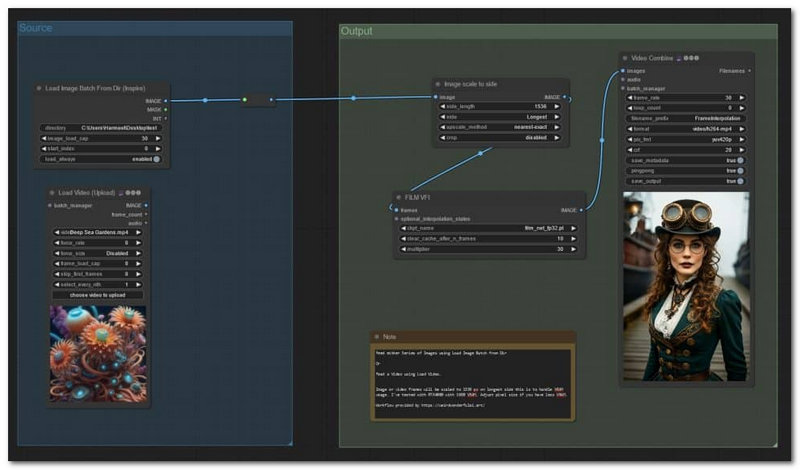
The best setting for video frame interpolation in ComfyUI depends on the type of scene the user is working with. In this section, we've prepared a list of scenes to help you estimate how ComfyUI video upscaling chooses the right model for the footage.
| Scene | |
|---|---|
| Slow Camera Movement | Use RIFE with a 2× boost (e.g., 24fps → 48fps). It’s fast and clean, with no weird artifacts. |
| Fast Action Movement | Use FILM or GMFSS, but only double the frames (2×). Keeps things smoother without smearing. |
| AI-Generated Video | Stick with RIFE (GACLove node). Set source fps (e.g., 24) and target fps (e.g., 60). Adjust batch size if your GPU struggles. |
| Complex Cinematic Shots | Try FLAVR or STMFNet. They need more frames to work well, so heavier on your GPU but great for layered motion. |
| Animate & Stylized Art Sequence | Use CAIN or Sepconv with a 2–3× boost. They handle non‑realistic imagery better. |
Pros
- It is capable of increasing a short video clip's frame rate.
- It can be used to smooth video motion in a generated or edited video file.
- It helps resolve low-FPS video generated.
Cons
- It has a very complicated setup which user will need to have an extensive knowledge to understand term and eventually use.
- An advanced video frame interpolation model demanded a strong desktop hardware.
Part 3. Alternative ComfyUI Frame Interpolation Tool
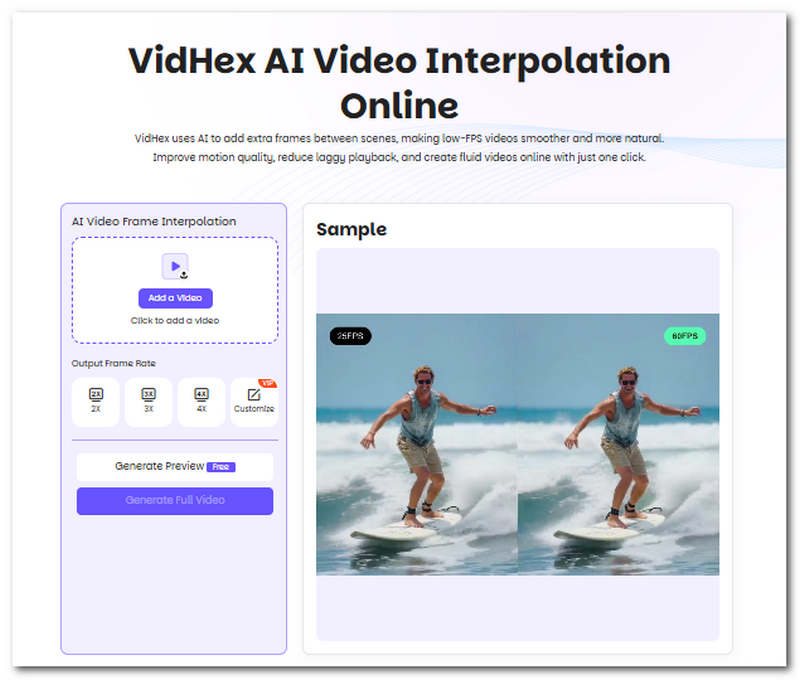
Now that you have basic knowledge about ComfyUI frame interpolation and realized that it is not a plug-and-play type of tool that anyone can just use, but rather just an extension that is applied to other tools for creating. In this section, we will feature a usable tool that novice users can try without complicated setup. VidHex AI Video Interpolation Online is a web-based tool that helps users instantly smooth low-FPS videos to match today’s standard playback.
Key Features:
• Enhances all video type that has low-FPS content.
• It can simulate a stunning AI slow motion.
• Capable of converting old footage to match higher FPS.
• Completely cloud-based tool.
• AI-powered tool for precise and accurate frame interpolation.
Part 4. FAQs about ComfyUI Frame Interpolation Tool
Does frame interpolation increase video quality?
Not entirely; frame interpolation mainly improves motion for smoother playback. It does not affect quality or increase video resolution.
Can ComfyUI convert a 16 FPS video to 32 FPS?
Yes, ComfyUI can interpolate frames in the video in a 2x sequence. For example, with ComfyUI and the right model, it can double a 16 FPS video to double the video’s original FPS; S hence, 32 FPS.
Why does frame interpolation use so much hardware?
Video frame interpolation needs to process a video, which means breaking it down frame by frame and inserting intermediate frames between them. The more frames it creates, the smoother the video can be, but it also requires more processing, which takes time and relies on desktop hardware to power it.
Conclusion
Video Frame Interpolation in ComfyUI is a workflow applied across various tools that allows a low-FPS video to be improved to a higher FPS. By creating extra frames between the video frames, it can make the video much smoother when played back. As such, it can be said that ComfyUI is not something a novice can instantly learn to use and navigate overnight; that’s why this guide also introduced an alternative video frame interpolation tool that is usable and accessible via a web browser. VidHex is a third-party tool that offers free frame-rate video upscaling while retaining and applying basic enhancements to make the video crisper and match the tool's FPS.

- Upscale videos to 4K/8K with AI.
- Increase FPS for smoother videos.
- Colorize B&W old recordings.
- Brighten the low-lit footage.
- Remove noise with details retained.