Aiarty Video Enhancer Review: The Best Video Enhancer Tool?
As AI-powered tools have become more normalized and are being developed and integrated into everyday usage in the field of video enhancement, Aiarty Video Enhancer Tool is on the rise to help users struggling with video quality problems by restoring their quality to its crystal-clear condition for a more solid and enjoyable video playback experience. But how does Aiarty Video Upscaler compete with other video enhancer tools, and how does it perform in today's time?
Look further, as this review had the opportunity to take a look at the AI video enhancer tool from its overview and features, pros and cons of usage, as well as a comparison table to an alternative capable video enhancer tool. From restoring grainy videos to improving the overall video quality, this review will help users to know Aiarty Video Enhancer better and if its still worth using the tool in the current year and the years ahead.
How We Tested Aiarty Video Enhancer
Before we jump right into it, knowing what Aiarty video enhancer app is, it is important to have discretion about how we test the tool and what our basis is for reviewing the video enhancer tool. Hence, for this section, feel free to read on and take it with a grain of salt.
• Usability. We tested and checked Aiarty's overall usability for ourselves, taking into consideration different types of users, from novices to users with technical knowledge of how to use it. Hence, for our test with Aiarty Video Enhancer, we checked its accessibility and ease of use.
• Function. Another thing we consider in testing tools is, of course, their function, features, and capabilities in producing results. Hence, for the Aiarty Video Enhancer case, we checked its built-in features, result quality, and found other features of the tool waiting for users to be uncovered.
• Quality. Lastly, we ensured we checked and tested Aiarty Video Enhancer in an actual test for a week to see and get varied quality results. Hence, in this review, users will get to know more about Aiarty’s overall usage and quality.
Part 1. What is Aiarty Video Enhancer?
Aiarty Video Enhancer is a software-based AI video tool developed to help out user resolves video quality problems through its denoising, upscaling, deblurring, and motion interpolation capabilities applied to a video when it is used to enhance it. As an AI video enhancer tool, it uses AI and integrates it into analyzing the video frame-by-frame to reconstruct missing details that were lost. Furthermore, Aiarty Video Enhancer is available for both Windows and macOS devices and runs smoothly in all versions, as it is lightweight.
In addition, the Aiarty Video Enhancer tool is a type of tool that relies on various propriety AI models that, all in all, work together in restoring video details and textures and, on top of that,t having a straightforward interface can easily help users utilize the tool for the first time without being overwhelmed just for enhancing their video.
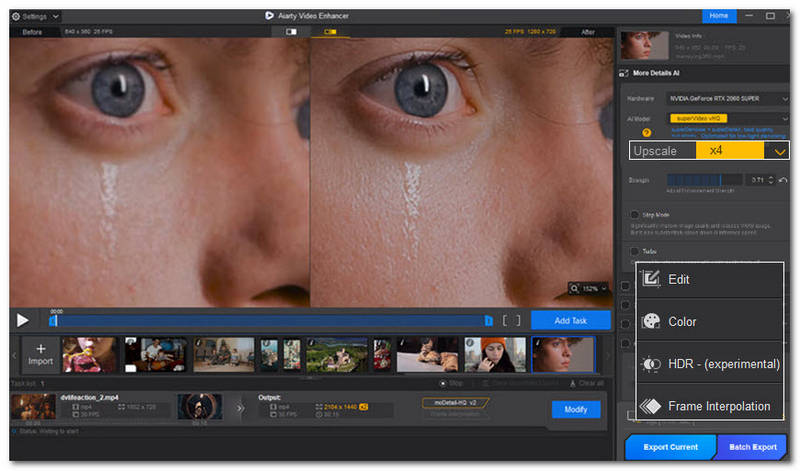
Key Features:
• AI-powered upscaling capabilities.
• Restoration of video detail and intricate texture generation.
• Effectively video denoising and deblurring functions.
• It features and optimizes various AI models in handling multiple video enhancement tasks.
• Capable of applying video frame interpolation on video for smoother video playback.
• Auto video and color tone enhancement and adjustment tool.
Part 2. Pros and Cons of Aiarty Video Enhancer
Pros
- High-quality video enhancement capabilities.
- It has a very straightforward and user-friendly interface.
- It is an AI-powered tool with access to multiple AI models that caters to all types of video enhancement needs.
- Video enhancement focused.
Cons
- The processing speed when exporting videos may be relatively slow at times and is solely dependent on the user's GPU.
- Users will need an HDR display to fully appreciate and view true SDR videos when the video gets enhanced in the tool.
Part 3. Aiarty Video Enhancer Crack: Is it Worth the Risk
Aiarty Video Enhancer is a versatile tool whose strengths lie in its range of AI models and features, making it ideal for specific use cases. It can also upscale videos from 1080p to 4K.
Arguably, while the tool can be used for free, being locked out of some of its killer and impressive tools, it doesn’t come with a very user-friendly price point, especially when the user does not deal with video quality fixing on a daily basis to make the cost worthwhile. And risking your device to find an alternative way to crack the tool for personal use may not be worth your time, as this can cause future problems to your device, security, etc. Thus, if you are leaning towards still wanting that versatility of a tool for video enhancement and fixing and yet wanting a more accessible or affordable availability for you, then you may want to explore or consider using our alternative AI video enhancer tool just below this section.
Part 4. Aiarty Video Enhancer VS. VidHex Video Enhancer
| Aiarty Video Enhancer | VS. | VidHex Video Enhancer |
| Up to 4K | Upscaling Quality Support | Up to 8K & customized quality and resolution size. |
| Average to moderate ease of usage. | Ease of Usage | Smooth and ease of usage. |
| Supported | Batch Video Processing | Supported |
| Supported | Frame Interpolation Support | Supported |
| MP4, MOV, MKV, and AVI | Supported Video File Format | MP4, MOV, MKV, AVI, MPEG, WMV, MPV, FLV, WebM, and more. |
| General Upscaling Model, Denoising and Cleaning Model, and Detail Restoration Model. | AI Models | General Enhancement Model, Face Model, Anime Model, Video Quality Repair Model, Detail Restoration Model, and more. |
Free
(Limited Features Use & Access)
$79.00
(Annually) | Availability | Free
(Available)
$31.92
(Monthly) |
Software-Based AI Video Enhancer Tool
(macOS & Windows) | Platform | Lightweight Software-Based AI Video Enhancer Tool
(macOS & Windows) |
Part 5. VidHex Video Enhancer: The Safer Alternative
If you need a more user-friendly and cost-efficient AI video enhancer tool that offers similar or better functionality in fixing and enhancing video footage, then the VidHex Video Enhancer tool is the one for you. This tool is an AI-powered video enhancer tool that can be easily launched on all desktop devices, as it is a lightweight tool to use while having multiple AI models available for users to use in addressing different types of video quality problems.
• Lightweight video enhancer software tool for desktop devices.
• Easy-to-use video enhancing and upscaling tool.
• AI-powered tool with multiple AI models for seamless video enhancement needs.
• It has automatic color correction functions.
• Fast video processing enhancer tool.
• Supports 8K and customized video resolution export quality.
• Has tons of features and customization options for fine-tuning video files.
How to Use the VidHex AI Video Enhancer Tool
Step 1. Download and install the VidHex AI Video Enhancer tool on your desktop device (Mac or Windows).
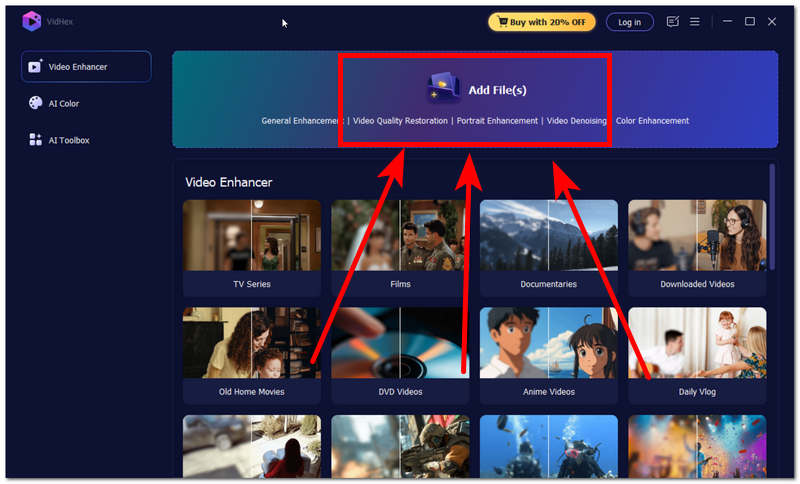
Step 2. Open the VidHex AI Video Enhancer software and, from its main interface, click on the Add Files field and select and load the video file you wish to enhance using the software tool.
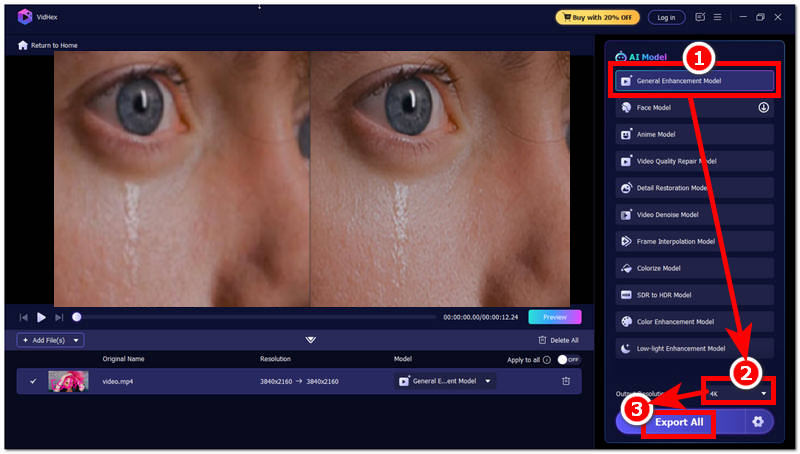
Step 3. Once the video file is loaded into the tool, proceed to click on the General Enhancement Model in the AI model list of the tool and head over to the Output Resolution situated in the lower part of the tool and set your resolution to 4K.
Step 4. After you have changed your Output Resolution size, proceed to click on the Export All button to have your video exported to your desktop device.
Part 6. FAQs about AI Aiarty Video Enhancer
Which AI model should I choose in Aiarty Video Enhancer?
In enhancing a video file with the Aiarty Video Enhancer tool, the best model for users to utilize when restoring details and video textures is the moDetail-HQ. For enhancing a video file for a more natural-looking enhancement, the best model to use is the generalenhancementt model, Smooth-HQ. And for heavy noise removal from a video, it is SuperVideo.
Can Aiarty Video Enhancer improve old videos?
Yes, Aiarty Video Enhancer AI can also be used for both enhancing videos and restoring old video footage. This is thanks to its AI, which combines various techniques to recover, improve, and remove video flaws ultimately.
Can Aiarty Video Enhancer improve low-light videos?
Yes, Aiarty Video Enhancer can bring brightness to a video file, as it is included in the enhancement process done by the tool for a video that is struggling with poor quality. Apart from auto-adjusting video brightness, Aiarty can also help denoise, remove blur and adjust color in video footage.
Conclusion
This guide has presented the Aiarty Video Enhancer overview, including how the tool works, what the possible pros and cons are for users when using the tool, as well as discussing the overall worth of using the tool in the upcoming years as an AI video enhancer tool. While it can be said that it is usable and certainly can help address and resolve video quality problems, it cannot have it all, l as it comes with restrictions in use when it comes to the availability of features in the free tier and the not-so-friendly cost. That’s why, as a backup, this guide also includes an Aiarty Video Enhancer alternative tool with a comparison to discuss so that users have the option to choose for their video enhancement and upscaling needs.


 VidHex — Enhance video quality with AI
 Enhance video details and clarity with AI technology and get stunning, high-quality video in any scenario.