


 VidHex — Enhance video quality with AI
 Enhance video details and clarity with AI technology and get stunning, high-quality video in any scenario.
16:10 Resolution: An Enhanced Resolution Experience Overview

Aspect Ratio is the width-to-height shape of a monitor screen, and it determines how video fits within that space. 16:10, on the other hand, is a unique and unusual aspect ratio, not as standard or popular as the 4:3 or 16:9 aspect ratio. While it can be said that 16:10 screen resolutions are not something a user uses for displaying their video files, as 16:9 is the standard screen resolution found in almost device this article will discuss what is 16:10 really is, list a complete list of 16:10 monitor resolutions, why it is becoming popular and among whose, and lastly demonstrate how one can make their low aspect ratio video to be able to play on 16:10 screen without stretching or zooming in on the video with a reliable AI video upscaler tool. So, what are you waiting for? If you have media content that has a low aspect ratio but want to learn how you can display it in your 16:10 display without any complicated method, then start learning what 16:10 is through this guide and discover the tools you may use for your video aspect ratio upscaler.

Contents:
Part 1. What is A 16:10 Screen Aspect Ratio?
The 16:10 screen aspect ratio is most common on monitors and tablet screens and allows users to have a more balanced display for both entertainment and productivity. As originally made for computer displays, this aspect ratio allows users to have more vertical screen space compared to 16:9. Although by looking at the numbers, it may not seem much of a change, in the context of a device screen, it is noticeable.
The utility of the 16:10 ratio extends beyond just entertainment or productivity; it also serves an excellent purpose for multimedia applications, such as watching videos and gaming. This is one of the reasons why it is a perfect ratio for users seeking a perfect balance of horizontal view and vertical space.
Although the 16:10 aspect ratio is not something new, in fact, it already existed in the early 2000s, and it emerged as an ideal choice for computer monitors and professional displays. Then, 16:10 died with 1080p TVs around 2009 and came back with the 2021 MacBook Pro and iPad Pro; most 14-16 inch creator laptops now ship 16:10.
Part 2. Complete List of 16:10 Monitor Resolutions
In this section, users will have an idea of the list of 16:10 monitor resolutions available today, some of which they may already be using but are not aware of or mistake for 16:9 instead.
| Name | Resolution | Pixels | Megapixels | Common Use |
|---|---|---|---|---|
| WXGA | 1280×800 | 1,024,000 | 1.02 | Older laptops, tablets |
| WXGA+ | 1440×900 | 1,296,000 | 1.30 | Budget laptops |
| WSXGA+ | 1680×1050 | 1,764,000 | 1.76 | 22″ monitors |
| WUXGA | 1920×1200 | 2,304,000 | 2.30 | 24″ monitors, laptops |
| WQXGA | 2560×1600 | 4,096,000 | 4.10 | MacBook Pro, iPads |
| WQUXGA | 3840×2400 | 9,216,000 | 9.22 | High-end laptops |
Part 3. Why Are 16:10 So Popular?
The popularity of 16:10 comes from the extra vertical space it provides on the display. In this section, we list some of the underlying factors that make the 16:10 display aspect ratio popular.
• The 11% (1200/1080=1.11) vertical screen space allows users, such as on computer displays, to see more content without scrolling as much compared to 4:3 and 16:9.
• Enhanced productivity, as the extra vertical space on the screen encourages more working area that a user can see and can also be considered as workspace.
• Better wide viewing angle; this is the 16:10 aspect ratio, as the extra screen space can bring in more details in video or gaming, which is for users who consume media like watching movies or have a thing for details and an immersive watching experience.
Part 4. How to Make Videos Look Sharp on High-Resolution 16:10 Screens
When it comes to how to make a video of a low aspect ratio match and appear as high resolution on 16:10 screens, there are multiple ways to do it as modern technology and tools are developed every day. One way is to re-edit the video and change the aspect ratio in professional editing software, but not everyone has the skill to use it. On the other hand, another method is to use an AI-powered video upscaler tool like the VidHex AI Video Upscaler tool, which can be used as an online-based tool or lightweight software tool that has a very straightforward user interface, making it easier for novices to navigate and perform their own video upscaling of any video that has an aspect ratio lower than 16:10.
VidHex can transform video files of any format to whatever aspect ratio a user prefers, like 16:10. This ensures that the video will not be stretched out just to fit the aspect ratio, but rather doubles the pixels to match the 16:10 screen display. With the help of a cutting-edge tool, it enhances and upscales the video at the same time without worrying about quality loss.
Key Features:
• Lightweight to use on all desktop devices.
• Allows users some control for fine-tuning upscaling results.
• Free and easy-to-use video upscaling tool.
• Fast video upscaler tool.
• It supports a wide range of video file formats.
• It is capable of upscaling and changing the video aspect ratio to any size.
• It is an AI-powered tool with multiple AI models developed for specific video enhancement needs.
• It has automatic color-accurate and color-correct functions.
How to Use the VidHex AI Video Upscaler Tool
Step 1. Go to the official webpage of VidHex AI Video Upscaler; from there, download and install the software tool on your desktop device (macOS or Windows).
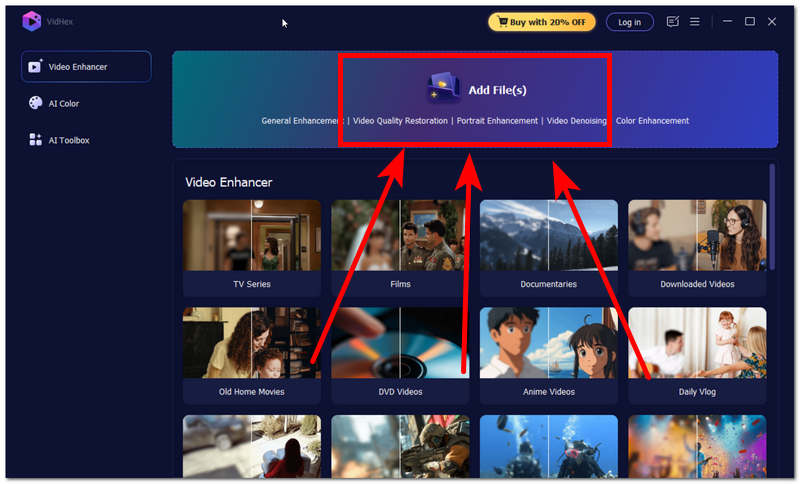
Step 2. Once installation is complete, launch the software and upload the video file you want to change the aspect ratio of in the Add Files field at the top of the interface.
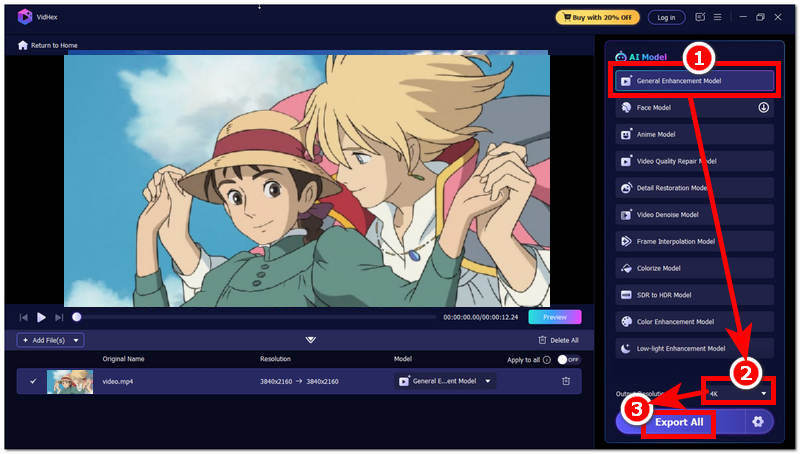
Step 3. Once the video file is loaded into the tool, proceed to click on the General Enhancement Model in the AI model list of the tool and head over to the Output Resolution situated in the lower part of the tool and set your resolution to 4K.
Step 4. After you have changed your Output Resolution size, proceed to click on the Export All button to have your video exported to your desktop device.
Part 5. FAQs about 16:10 Aspect Ratio
Is 16:10 the same as 16:9?
No, 16:10 is not the same as 16:9, aside from the slight number difference. 16:10 is mostly used in computer displays as it has more vertical space, whereas 16:9 is most commonly seen on mobile devices and streaming platforms.
Is 16:10 good for gaming?
Yes, there are many monitors screen that has a 16:10 aspect ratio, which provides more vertical viewing space compared to 16:9. However, it still depends on whether the game supports the aspect ratio, or it will have black bars or a slight zoom in the game when the game isn’t suited for a 16:10 screen aspect ratio.
What is the best 16:10 resolution?
Generally, a 16:10 display screen should have at least a 1920 x 1200 resolution size to ensure that the content is fit to the screen space without the having the presence of the black bars or cropping the content. If the user wants the best detail resolution in the content of a 16:10 aspect ratio, they can use 2560 x 1600 resolution for greater detail.
Conclusion
This article discusses what a 16:10 aspect ratio screen is all about, and through this guide, users have become fully aware of the fact that it is something that existed long before and is considered the predecessor or an improved version of the standard aspect ratio 4:3 size. Furthermore, this article has not only explained the 16:10 aspect ratio but also listed the 16:10 monitor resolutions and their common uses to give much better context for how 16:10 is utilized. Thus, it is popular with computer display screens and gaming, but it is not limited to that, as any low aspect ratio video can now be transformed or turned to fit a 16:10 aspect ratio screen with the help of an AI video upscaler, which is also featured in this guide with a demonstration of how one can use it as a video upscaler tool.
- Upscale videos to 4K/8K with AI.
- Increase FPS for smoother videos.
- Colorize B&W old recordings.
- Brighten the low-lit footage.
- Remove noise with details retained.


