


 VidHex — Enhance video quality with AI
 Enhance video details and clarity with AI technology and get stunning, high-quality video in any scenario.
What Is Bitrate? How does it affect your streaming and Recording?

You finish editing a video that looks sharp and smooth on your computer. But after uploading it to YouTube, the image suddenly looks blurry, blocky, or full of compression artifacts—especially during fast motion scenes. In many cases, the problem comes down to one setting: bitrate.
Bitrate is one of the most important factors in digital video. It appears in camera settings, video export menus, streaming platforms, and upload recommendations. But what is a birate? How does it affect video quality?
In this guide, you’ll learn what bitrate is in simple terms, how it influences video quality and file size, and how to choose the right bitrate settings for recording, editing, streaming, or uploading videos.

Contents:
Part 1. What Is Bitrate? The Simple Definition
In the simplest terms, bitrate is the amount of data processed or transmitted every second.
Digital video is made up of data. Bitrate measures how much of that data is used in each second of the video.
Units of Bitrate
Bitrate is usually measured in:
• bps — bits per second
• Kbps — kilobits per second
• Mbps — megabits per second
For most modern video, bitrate is measured in Mbps.
For example:
• A video with 5 Mbps means 5 megabits of data are processed every second.
• A video with 50 Mbps contains much more information per second.
A Simple Analogy
Imagine bitrate as the width of a highway.
• A low bitrate is like a narrow road. Only a few cars can pass at once.
• A high bitrate is like a wide highway. Many cars can move smoothly.
In video terms:
• Low bitrate = less image information
• High bitrate = more image detail and smoother motion
However, a wider highway also requires more storage and bandwidth.
Part 2. The Meaning of Bitrate in the Digital World
To better understand bitrate, we need to look at how digital video works.
Video Is Made of Data
Every digital video is actually a long stream of binary data consisting of 0s and 1s. These numbers describe:
• color
• brightness
• movement
• image details
When a video plays, your device reads this stream of data and converts it into moving images.
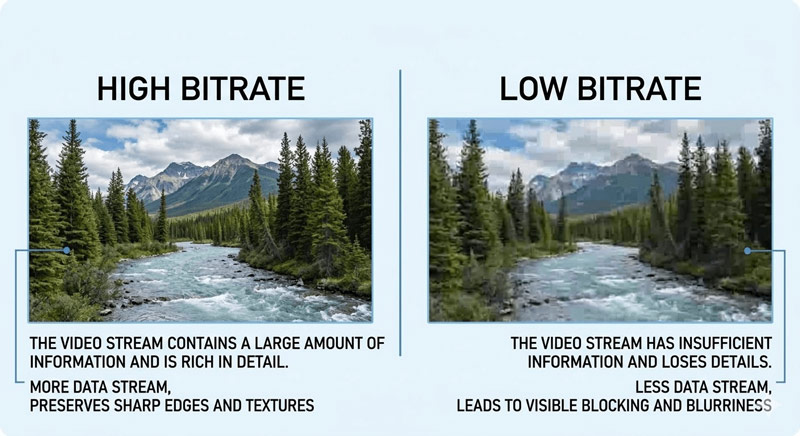
The bitrate determines how much information is included in that stream every second.
If the bitrate is too low, the video may lose detail and show compression artifacts.
Bitrate and File Size
Bitrate also directly affects the size of a video file.
A simple formula explains this relationship:
File Size = Bitrate × Duration
This means:
• Higher bitrate → larger file size
• Lower bitrate → smaller file size
For example:
• A 10 Mbps video that lasts 10 minutes will be much larger than a 2 Mbps video of the same length.
Because of this, bitrate is always a balance between:
• video quality
• file size
• network bandwidth
• compression ratio
Streaming platforms, cameras, and editing software all manage this balance in different ways.
Part 3. Bitrate vs. Resolution: Why "4K" Isn't Everything
Many people assume that higher resolution always means better quality. For example, they may think that a 4K video must look better than a 1080p video.
In reality, this is not always true.
Resolution Needs Enough Bitrate
Resolution describes the number of pixels in a frame. For example:
• 1080p = about 2 million pixels
• 4K = about 8 million pixels
A 4K video contains four times as many pixels as 1080p. That means it also needs much more data to describe all those pixels.
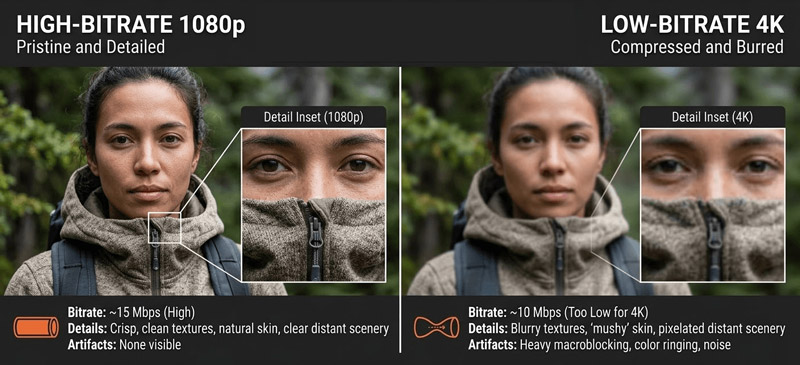
If the bitrate is too low, the video encoder must compress the image heavily. As a result, a low-bitrate 4K video may look blurry, blocky, or noisy.
In some cases:
A high-bitrate 1080p video can look better than a low-bitrate 4K video.
Export Setting Suggestions
While the ideal bitrate depends on many factors, here are some general guidelines:
For YouTube uploads:
• 1080p video: about 8–12 Mbps
• 4K video: about 35–45 Mbps
For local archiving or editing masters:
• 1080p video: 20 Mbps or higher
• 4K video: 60 Mbps or higher
These higher values help maintain quality during future edits or re-encoding.
The Art of Compression
Modern video software uses video encoding to compress video while trying to keep the quality as high as possible.
Encoding works by:
• removing unnecessary information
• predicting motion between frames
• reusing similar image data
Good compression can greatly reduce bitrate without making the quality noticeably worse and achieve an ideal compression ratio. However, if the bitrate is pushed too low, visible artifacts will appear.
That is why bitrate remains one of the most important settings in video production.
Part 4. How Bitrate Affects Your Video Processing Workflow
Bitrate plays a role in many parts of the video workflow, including recording, editing, exporting, and streaming.
Encoding Efficiency
Different codecs and encoding methods use the bitrate more efficiently than others.
Modern codecs can maintain good visual quality even at lower bitrates. This is important for online streaming platforms, where bandwidth is limited.
Better encoding efficiency means:
• smaller file sizes
• faster uploads
• smoother streaming
Motion Compensation
Bitrate becomes especially important in fast-moving scenes.
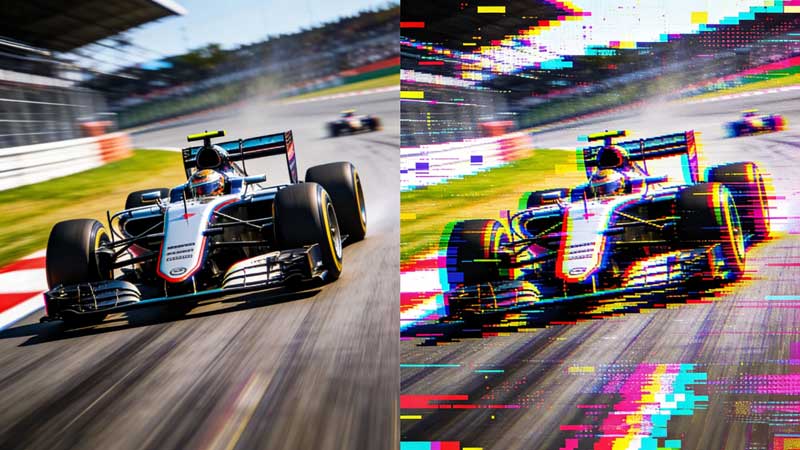
Videos with lots of motion—such as sports events, racing footage, or action scenes—contain constant changes between frames. These changes require more data to describe accurately.
If the bitrate is too low in these situations, you may see problems such as:
• blocky compression artifacts
• blurry motion
• grainy textures
This effect is often called pixelation.
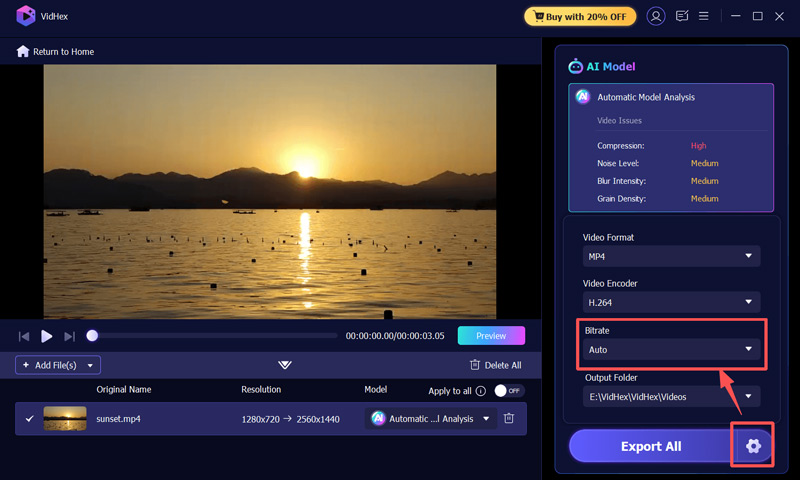
We have all encountered precious old videos or downloaded videos that are full of jagged edges and color blocks due to low bitrate. Simply increasing the export bitrate cannot solve the problem; what you need at this time is the intervention of AI video enhancement tools. For example, VidHex Video Enhancer can help restore clarity by reducing blur, removing compression artifacts, and sharpening lost details. Instead of re-encoding the same low-quality file, enhancement tools analyze the frames and rebuild missing visual information, making the video look cleaner and closer to high-quality footage. This can be especially useful when working with older clips or heavily compressed videos.
Step 1. Choose the General Enhancement Model on the right side of the page.
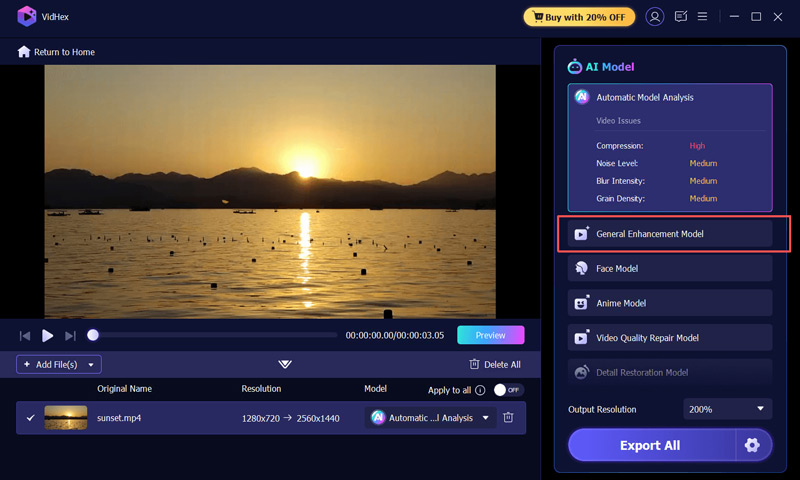
Step 2. Choose a suitable Bitrate and export.
Part 5. FAQs about Bitrate
Will increasing the bitrate fix a blurry original video?
No. Increasing the bitrate during processing cannot "create" detail that wasn't there in the first place. It only ensures that the existing quality is preserved as much as possible during encoding. Bitrate is about retention, not creation.
What is the "sweet spot" for video bitrate?
This depends on the codec (like H.264 or HEVC/H.265). For a standard 1080p 30fps video using H.264, 8-10 Mbps is usually the sweet spot. If you use a more advanced processor with H.265, you can achieve the same quality at nearly half that bitrate.
Why does my video look pixelated in dark scenes, even with a high resolution?
This is a classic symptom of low bitrate (or poor encoding). Dark areas and gradients require precise data to render correctly. If the bitrate is too low, the encoder "groups" similar dark pixels together, creating a blocky effect known as macroblocks.
Conclusion
Bitrate is one of the most important concepts in digital video. It controls how much data is used to represent every second of footage, which directly affects video quality, file size, and streaming performance.
Once you understand bitrate, you can make better decisions when recording, exporting, or uploading your videos. This knowledge helps you balance quality, storage, and performance—which is essential for any modern video workflow.

- Upscale videos to 4K/8K with AI.
- Increase FPS for smoother videos.
- Colorize B&W old recordings.
- Brighten the low-lit footage.
- Remove noise with details retained.


