VidHex — Enhance video quality with AI
 Enhance video details and clarity with AI technology and get stunning, high-quality video in any scenario.
Contents
- Part 1. Quick Answer: What Is the Difference Between UHD and HD?
- Part 2. HD vs UHD: Resolution Comparison
- Part 3. What Is HD?
- Part 4. What Is UHD?
- Part 5. Is UHD Better Than HD? When It Matters
- Part 6. Can HD Content Become UHD? TV Upscaling vs AI Upscaling
- Part 7. How to Upscale HD Video to UHD with VidHex
- Part 8. FAQ About UHD and HD
HD or UHD: Differences, Resolution Comparison

No matter what device you use to view photos, videos, or other digital content, resolution directly affects how the content appears on your screen. HD and UHD are among the display resolution sizes that are the standard; however, not many are aware of their differences or what’s best to display their digital content for a crisper and more detailed display. That’s why this article will take a closer look at the two most popular video display resolutions and serve as a guide to compare and contrast them. This guide will explain HD vs UHD by identifying the difference between the two, compare their resolution, define each resolution, answer some frequently asked questions on video upscaling content, and lastly, provide insights and solutions on how one can easily upscale their digital content, especially video files, through an online video upscaler tool.
Contents:
- Part 1. Quick Answer: What Is the Difference Between UHD and HD?
- Part 2. HD vs UHD: Resolution Comparison
- Part 3. What Is HD?
- Part 4. What Is UHD?
- Part 5. Is UHD Better Than HD? When It Matters
- Part 6. Can HD Content Become UHD? TV Upscaling vs AI Upscaling
- Part 7. How to Upscale HD Video to UHD with VidHex
- Part 8. FAQ About UHD and HD
Part 1. Quick Answer: What Is the Difference Between UHD and HD?
As UHD and HD are both video resolution formats that deliver a viewable and high-quality visual on the media that it displays, they differ in many areas. In this section, we will briefly list the key differences between HD and UHD video resolutions.
When it comes to details, UHD displays finer textures with cleaner, smoother edges, which, in the case of HD, appear more subtle and a lot softer. This difference in detail is noticeable when viewing a media file that is also taken or is in high resolution, as UHD can bring out the finest details of the media, while HD is also decent and viewable; the quality is inferior compared to UHD.
Another key difference that is noticeable between HD and UHD is the Color Depth and High Dynamic Range (HDR) support. UHD devices and screens have this HDR technology that allows them to further enhance digital content by improving the content brightness, contrast, and color. Compared to HD, which also supports HDR technology, UHD displays richer visuals.
Lastly, another difference between the two video resolutions is their File Size and Bandwidth Requirements. As HD usually makes a great fit for small devices, having a lower resolution size, it is easier to store, transfer, edit, and stream, making HD conveniently more practical for everyday usage. UHD, on the other hand, has much larger storage space consumption and requires high and stable internet connectivity to be able to play it.

Part 2. HD vs UHD: Resolution Comparison
As both HD and UHD display a viewable image on the media file, when users are aware of their respective resolution size and total pixels, they may be able to take advantage of the quality of their content. This section is a quick resolution comparison between HD and UHD.
As HD video resolution has fewer pixels and a lower resolution size, it is the perfect size to display digital content with lower resolution than UHD and on smaller display devices, which is perfect for casual and convenient viewing of the digital content. UHD is great for displaying higher-quality digital content and viewing it on a much larger screen, allowing viewers to appreciate the intricacy of the level of detail in the medium.
| HD | UHD | |
|---|---|---|
| Resolution Size | 1280 × 720 to 1920 × 1080 | 3840 × 2160 |
| Total Pixels | Approximately 2 million | Approximately 8 million |
Part 3. What Is HD?
HD, or High Definition, is a type of display resolution and is the standard resolution that is good for casual use, as it is lightweight on storage and easy to load with average bandwidth speeds. As previously stated, the resolution size for HD is 1280 × 720 to 1920 × 1080. This display resolution also supports HDR as long as the content and other displays are capable of applying HDR effects to the media. Furthermore, what makes this resolution useful is that it is everyday-use friendly, as it has a lower file size and low internet dependency.
Part 4. What Is UHD?
UHD, or Ultra High Definition, is a higher display resolution designed for bigger screens, as digital content usually is. UHD resolution has more pixels and a higher resolution, which means the digital content will be able to show much sharper and finer details. As a display resolution made recently, it caters to modern devices, but the cost of it all having superiority in overall quality is that it makes the digital content have a larger file size; it will require higher bandwidth and is perfect for professional usage.
Part 5. Is UHD Better Than HD? When It Matters
Generally, UHD is better than HD because the resolution and pixel density are much higher, making the digital content more detailed and crisp-looking. However, there are considerations to make when it comes to practicality and user preference regarding what they should consider using for their digital content. In this section, we will discuss more about what makes both display resolutions better to use.
• HD resolution is better and ideal for smartphones, social media uploads, and other small-screen devices or platforms. As smaller screens aren’t really for displaying the intricacy of the detail of the video, HD display resolution is enough for decent visual quality while consuming less storage and space on the device.
• UHD resolution is better for displaying high-quality visual content on a much larger device like a larger television, high-end monitor, cinematic screen, and for professional video editing. The high-resolution UHD delivers the utmost clarity of details, perfect for appreciating the whole digital content.
Part 6. Can HD Content Become UHD? TV Upscaling vs AI Upscaling
As upscaling becomes a thing in improving digital content, the question is asked: is it possible for HD content to become UHD? Of course, it is now possible to make HD content have that UHD feel to it through a process called upscaling, and to achieve that, there are two ways to do it: one is by TV hardware upscaling, and the other is through the use of an AI upscaling tool. This section will delve into what TV upscaling and AI upscaling are.
TV Upscaling
TV Upscaling is a process that works within television devices to make low-resolution videos or content appear sharper and higher resolution to match the larger resolution size of the TV screen. TV Upscaling happens in real time the moment a user plays a video on a TV screen-enabled device such as Sony TV; it doesn’t need a software tool in order to upscale a video, nor does it require any methods users will have to use to upscale the video. The downside of TV upscaling is that it doesn’t make or create a permanent upscaling on the video file, meaning that as soon as the video is taken off the TV, it will revert back to how it was in terms of quality and resolution.
AI Upscaling
AI Upscaling uses an AI model that is trained to take low-resolution videos and content and make it a more higher quality feels to it by enhancing and reconstructing video frame details. AI Upscaling produces a permanently sharper result on the video file, as it uses an AI model that analyzes and goes through the video frame-by-frame in order to reconstruct and enhance the overall quality of the video. This process is perfect for users who want to have a saved, enhanced copy of the video that would allow them to play it on other devices. However, while this is most likely useful for video file sharing, unlike TV upscaling, it is not automatic, and users will have to navigate and use a third-party software tool in order to upscale a video.
| TV Upscaling | AI Upscaling | |
|---|---|---|
| How It Works | It uses the built-in TV algorithm to interpolate pixels in the video to give it a higher-quality feel. | It uses and relies on AI models that are trained to enhance and address video quality problems and fix them permanently. |
| Detail Recovery Capability | It has very limited detail-recovery strength. | It has very flexible detail recovery, as users can adjust and control settings to further refine the result. |
| Processing Location | It happens in real time while the video is being played or displayed on the TV. | It takes place on the AI upscaling software tool or webpage. |
| Speed | Instant | Takes a few steps and adjustments to process the video file. |
| Best For | Everyday video viewing. | Perfect for video restoration, content creation, and remastering. |
Part 7. How to Upscale HD Video to UHD with VidHex
When it comes to AI Upscaling and wanting to try it yourself, you can upscale HD videos to UHD first by using a reliable and true AI Video Upscaler tool like the VidHex AI Video Upscaler. This tool is powered by AI with multiple AI models that address different video quality problems, leaving no trace of low resolution on every video played on every device.
How to Use the VidHex AI Video Upscaler Tool
Step 1. Download the VidHex AI Video Upscaler software tool from their website, and once done, install the software tool accordingly.
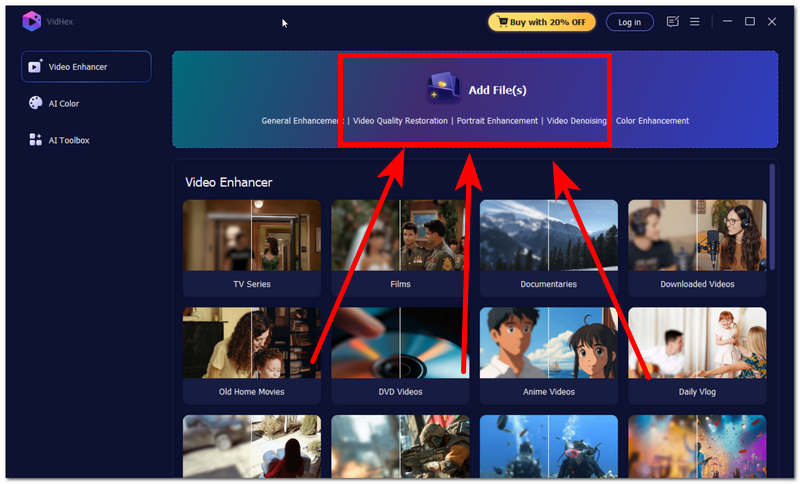
Step 2. Open the software tool and, from its main interface, click on the Add Files field and select the video file you wish to AI upscale using the software tool.
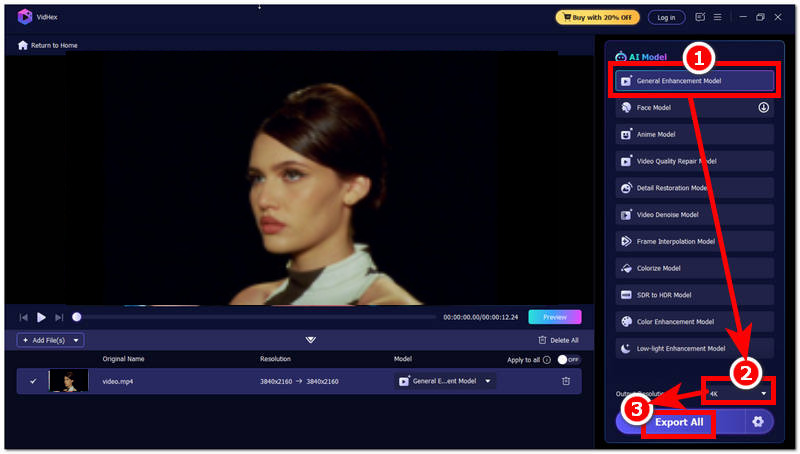
Step 3. Once the video file is loaded into the tool, proceed to click on the General Enhancement Model in the AI model list of the tool and head over to the Output Resolution situated in the lower part of the tool and set your resolution to 4K.
Step 4. After you have changed your Output Resolution size, proceed to click on the Export All button to have your video exported to your desktop device.
Part 8. FAQ About UHD and HD
Is 4K the same as UHD?
No, 4K and UHD are technically not the same; people often use them interchangeably in consumer video. UHD has a 3840 x 2160 resolution, whereas 4K has 4096 x 2116.
Does UHD always look better than HD?
Not always; it really depends on the quality of the media file a user is trying to play. When the user has a low-resolution video, then it is better to play it on an HD-resolution screen or device; UHD, on the other hand, requires a higher video file resolution.
Conclusion
This guide has explored what HD and UHD are through a comparison of the two video display resolutions. While it is great that having a larger resolution can make a video file or any digital content appear more detailed and crisper, it comes with the cost of having a larger file size and sometimes requires more stable internet bandwidth to play it. This just means that HD still has a role to play, as it best fits smaller screen devices. Both video resolutions have their own use and purpose, and through this guide, users have learned their differences, which is better for which situation, and upscaling through TV and the use of AI tools like VidHex.

- Upscale videos to 4K/8K with AI.
- Increase FPS for smoother videos.
- Colorize B&W old recordings.
- Brighten the low-lit footage.
- Remove noise with details retained.