


 VidHex — Enhance video quality with AI
 Enhance video details and clarity with AI technology and get stunning, high-quality video in any scenario.

OpenAI Sora 2 generates AI videos capped at 1080p with soft edges, noise and motion ghosting, and social media compression worsens quality. This guide recommends the desktop VidHex AI Video Upscaler to boost Sora 2 clips to 4K 8K via denoising, sharpening and color tuning. It walks through its workflow, compares native Sora 2 output against VidHex enhanced results in a table, and answers common questions about resolution, supported formats and processing time. Sora 2 creates raw AI footage while VidHex polishes videos for professional grade publishing.
Best Sora 2 Video Upscaler for Smoother 4K AI Video Quality
Quick Answers:
Sora 2 refers to OpenAI's text-to-video model, which lets users input their ideas and turn them into AI video clips for effective storytelling, media production, and more. As of 2026, the standard web based Sora 2 generates videos up to 720p, while Sora 2 Pro supports a maximum 1080p output. This limitation can be troubling when users require higher quality footage. Thus, to make up for it, there are tools developed to help users with poor video quality at least recover or better enhance the video quality to 4K or much higher resolution by using an AI video upscaler, which, in this matter, can be of help and used as a Sora 2 AI video upscaler.
Contents:
Part 1. Why You Need A Video Upscaler for OpenAI’s Sora 2?
Currently, AI-generated video can only be produced in clips and with a certain resolution quality when generating multiple videos, especially with Sora 2. AI can be challenging, especially because not every generated output may have the same quality or color composition. Thus, there are many reasons why there is a need for a user to have video upscaler tools, especially when producing AI videos: firstly, to ensure a smooth and high-quality output and to make it easy to recover missing details when needed.
While normally the purpose of a video upscaler is for low-resolution videos to recover or revert to their missing quality and details, it can also be of use in AI-generated videos to further improve and sharpen video edges and preserve resolution as much as it can when users upload them to social media sites, which are known to re-compress video quality.
Part 2. The Best Sora 2 Video Upscaler in 2026
While there are a bunch of video upscalers on the internet today, from underrated to premium tools, the best among them is the type of tool that can be used for users' video upscaling needs in general, regardless of what the concern is in the video. Such video upscaler tools are equipped with AI technology and house various AI models to help users of an OpenAI video generator further address and improve the video. Such tools include the VidHex AI Video Upscaler tool.
What VidHex AI Video Upscaler offers to upscale Sora 2videos is genuine 4K video resolution quality that allows the video to recover missing details while also adhering to and adopting various AI-enhancing capabilities to ensure that the video not only improves in quality but also keeps it up to a certain upscale where it does not overprocess it. It comes with multiple AI models to help users address very specific problems in generated AI videos, as well as handle processing and upscaling with high-speed efficiency without failure or quality loss.
Key Features:
• Lightweight desktop video upscaler tool.
• Free to use and easy to use.
• Upscale videos to 1080p to 4K, and even 8K..
• Guaranteed to work on multiple video file formats.
• Processes and exports videos at high speed.
• Clear video footage, enhances color, and denoises.
• It is powered by capable AI technology.
• Equipped with multiple AI models for various video upscaling functions.
• It can restore face details.
Step 1. Download and install the VidHex AI Video Upscaler on your desktop device (Windows or Mac). After successfully installing the VidHex AI Video Upscaler, open the program.
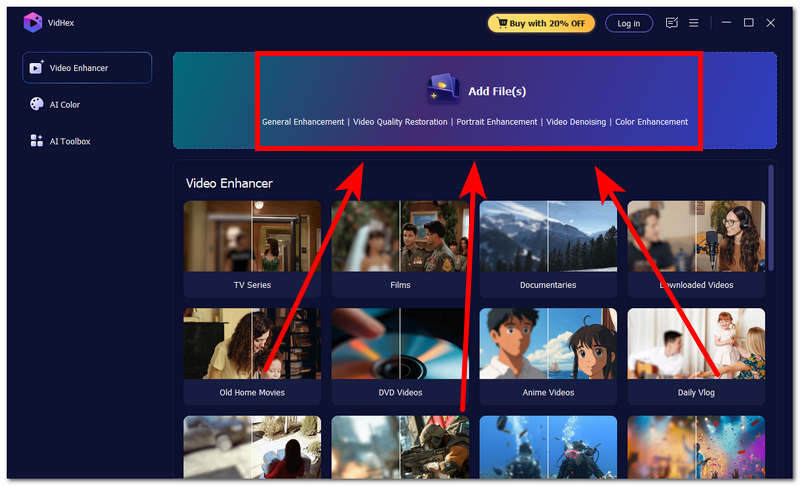
Step 2. From the VidHex AI Video Upscaler main interface, locate and click on the Add File(s) button field, and the program will let you browse your computer folder and, by that, simply select the AI video you generated from OpenAI’s Sora 2 to the tool.
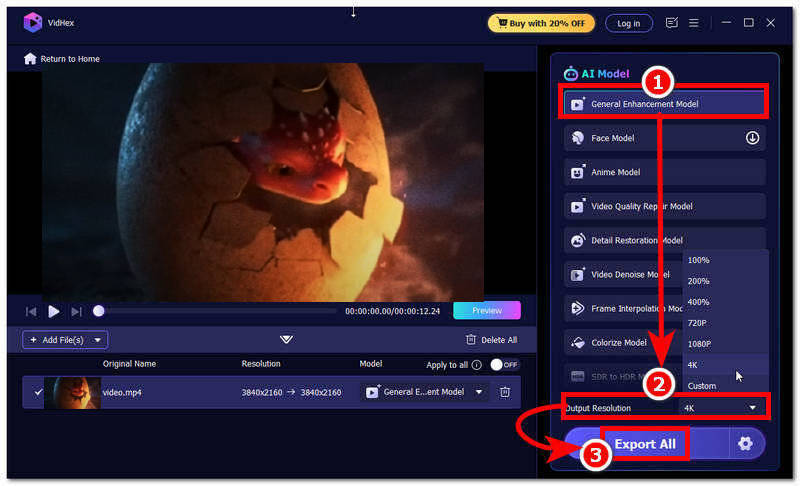
Step 3. Once you have uploaded your AI video into the tool, click on the General Enhancement Model in VidHex; then change the output resolution to 4K or your preferred resolution.
Step 4. Finally, click the Export All button to export your video to your desktop device's designated folder.
Part 3. Sora 2 Native Output VS VidHex Enhanced
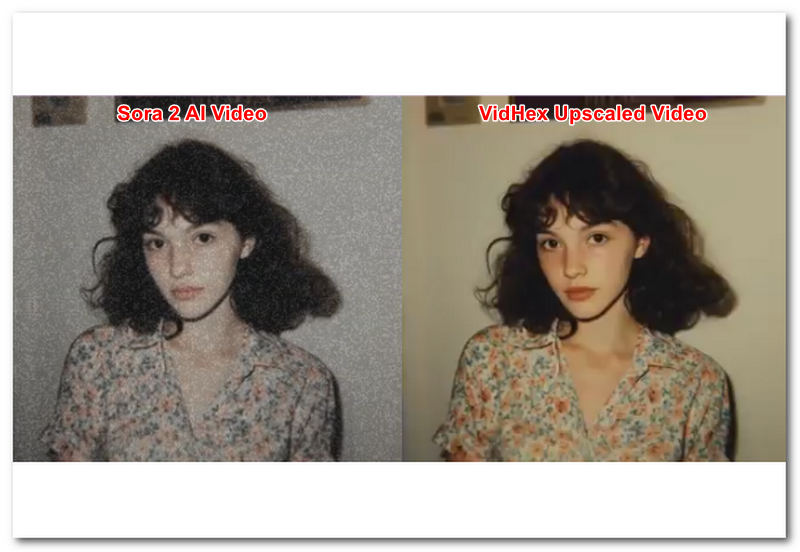
Comparison test conditions: Test footage generated from Sora 2 Pro (1080p, 12 second clip). VidHex processing settings: General Enhancement Model, target output resolution set to 4K, default denoise enabled. Actual results may vary depending on source video quality, clip length and chosen AI model.
| Sora 2 Native Output | VidHex Upscaled Output | |
|---|---|---|
| Resolution | Sora 2 produces a decent AI video with up to 1080p resolution. | VidHex can take any video resolution and enhance it to 4K–8K resolution. |
| Sharpness | It produces soft edges, some blur, and evident noise from time to time. | It gives the video sharper edges, restored detail, enhanced color, as well as a softer look. |
| Noise/Artifacts | It has very visible compression noise in the video. | It performs noise cleaning on the video frames, frame-by-frame. |
| Bitrate | Appears to use a lower bitrate, optimized for quick generation and seamless video upload through various platforms. | It can use a much higher bitrate, optimized for quality video playback across multiple devices and platforms. |
| Motion Clarity | There is obvious and occasional ghosting in fast scenes. | Uses an AI video motion model to help improve motion stability as well as quality in each video frame |
| Platform Readiness | Good for drafts and previews. | Ready for YouTube, PowerPoint, and various social media platforms. |
| Use Case | Concept prototyping, idea visualization. | Professional publishing, archival quality. |
Why Choose VidHex AI Video Upscaler?
In every sense, VidHex Upscaled Output results are more impressive than the native Sora 2 output. Firstly, there is a gap in the resolution quality offered by the two tools, but VidHex also improves Sora 2 video output quality by giving the video a more polished, denoised, and much more accurate color. Furthermore, Sora 2’s main use is to generate AI videos by turning the user's idea input into video clips, while VidHex is used to upscale the video generated by Sora 2, making the two tools compatible with one another and complementing each other's purpose.
Part 4. FAQs about Sora 2 Video Upscaler
What video resolutions does Sora 2 support?
As of 2026, Sora 2 supports multiple output resolutions: 480p and 720p for standard web users; 480p, 720p and maximum 1080p are available for Sora 2 Pro / premium subscribers.
Can Sora 2 upscale old videos?
Yes, Sora 2 can be used as a video upscaler, but it can only upscale videos up to a certain quality and level of detail restoration. That’s why, while it is perfect for generating AI videos from scratch,h it needs to be paired with a reliable and functional AI video upscaler tool like VidHex to fill in the gaps of the AI video in terms of quality and such.
What video formats are supported?
The formats most AI video upscalers support are video file formats like MP4, WebM, MKV, MOV, and AVI. While some offer a wider range of video file format support, in most cases AI video upscalers support and accept common, universally popular video file formats.
How long does video upscaling take?
There are a variety of factors why the upscaling of a video takes longer than usual some can be rooted trough the video lengths, the original resolution of the video that is being upscaled, the quality or target resolution the user aims to apply in their videos, the hardware of the computer or the device running the video upscaler tool, as well as the capabilities of the AI that is embedded in the upscaler tool.
Conclusion
This guide has discussed the difference between an AI Video Generator tool (Sora 2) and an AI video upscaler tool (VidHex) through a chart comparing video quality. This guide also argued that when using an AI Sora 2 video generator, it is better to use a third-party tool such as the VidHex AI video upscaler tool to help upscale the generated AI videos to a quality Sora 2 can’t produce at a free-tier scale. Thus, users need an AI Sora 2 video upscaler tool, especially when they need more polished, crisp, and vibrant video motion and quality.
Moreover, it is also worth noting that, as of 2026, Sora 2 includes basic built in upscaling. Its ceiling is 720p for standard web access and 1080p for Sora 2 Pro. This can still feel underwhelming for content shared to social platforms, which apply further compression. Upscaling footage to 4K or higher with third party tools helps mitigate visible quality loss caused by platform compression.
VidHex – AI Video Enhancer
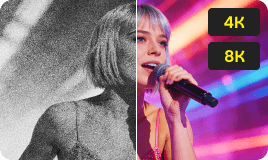
- Upscale videos to 4K/8K with AI.
- Increase FPS for smoother videos.
- Colorize B&W old recordings.
- Brighten the low-lit footage.
- Remove noise with details retained.


