VidHex — Enhance video quality with AI
 Enhance video details and clarity with AI technology and get stunning, high-quality video in any scenario.
CapCut Online Video Enhancer: A 4K Video Upscaler Tool

CapCut, a user-friendly and popular video editing platform on mobile and desktop devices, has made its way into providing services even on web browsers, allowing users to use video editing and enhancement features and functions for free on its web, like the popular CapCut Video Online Upscaler Tool. As video quality can be annoying, having access to a versatile and full-featured editing and enhancement video program such as CapCut is the answer some users are waiting for. Thus, in this guide, users will have an overview of the CapCut AI video enhancement capabilities, to be exact, its upscaler tool on the web-based level. In addition, this guide will also demonstrate how to use it and provide readers with a comparison chart to learn more about CapCut’s video upscaler capabilities, pros and cons in comparison to another AI online video upscaler tool.

Contents:
Part 1. Comparison Chart
In this section, we prepared a quick comparison chart with CapCut Online video upscaler and VidHex’s online and desktop video upscaler tool to ensure that users will be able to see each tool's capabilities, thus helping the user form an idea of which tool is the perfect fit for their needs.
| Video Upscaler Tools | Best For | Output Resolution | Availability |
|---|---|---|---|
| CapCut Online | Social media and professional video editing. | Up to 2K | Desktop device, mobile device, and web browser. |
| VidHex Online | Casual video uspcaling needing. | Up to 8K | Web-browser |
| VidHex Desktop | Advanced video upscaling capabilities. | Up to 8K | Desktop device |
Part 2. CapCut Online Video Upscaler Review
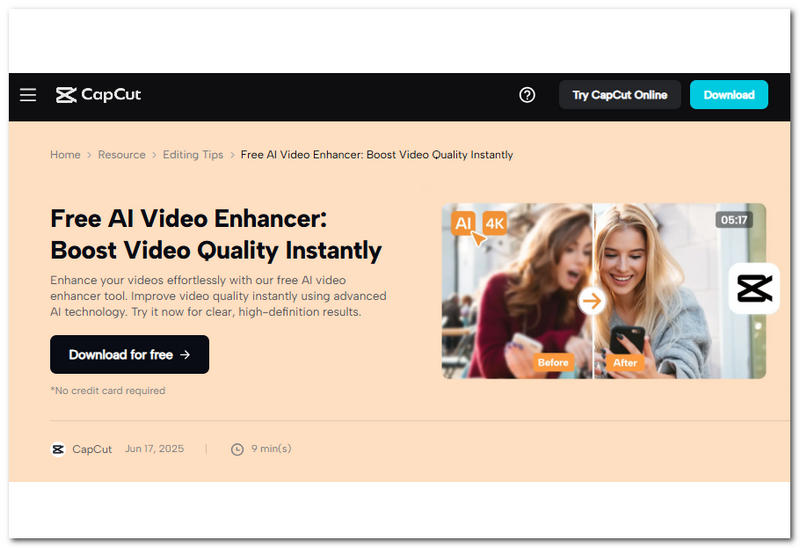
CapCut Online Video Upscaler tool is a standalone, accessible and ready-to-use video enhancement tool on the web for users who need a quick and basic video upscaling tool. As part of CapCut’s quick functional tools, users just have to go to CapCut’s webpage in any web browser and upload the video instantly.
Key Features
• It is capable of removing video grain.
• It is an AI-powered tool to upscale video resolution footage.
• Performs automatic adjustments to sharpen video details without losing original video elements.
• It provides color correction and color boost to the video.
• It does not overprocess the upscaling of the video.
• Easily refines and helps recover missing or lost video details.
• Removes annoying light flickers in video footage.
• Capable of brightening video while also reducing the presence of video noise.
• It is capable of exporting low-quality videos into 4K resolution.
How to Upscale Video in CapCut Online Video Upscaler
Step 1. Using your device (mobile or desktop) browser, head over to the CapCut Online Video Upscaler Tool webpage and click the Import button on its main interface and select the video file you want to upscale using the tool.
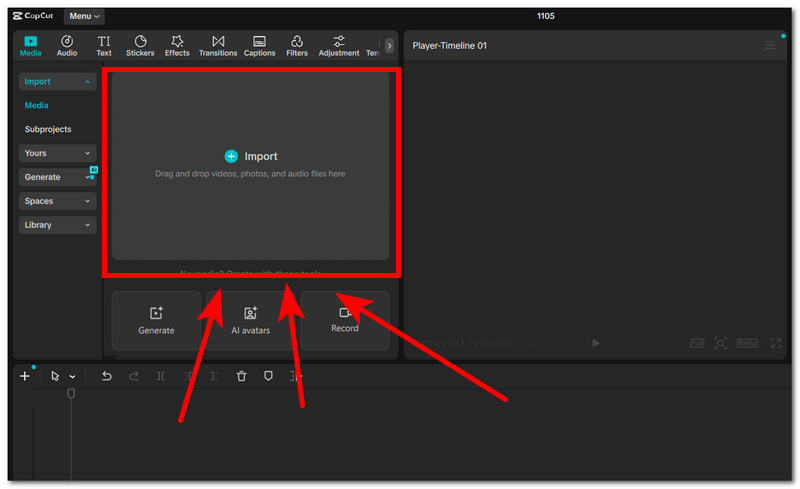
Step 2. Once the video is uploaded within the tool interface, proceed to drag your uploaded video into the application media panel.
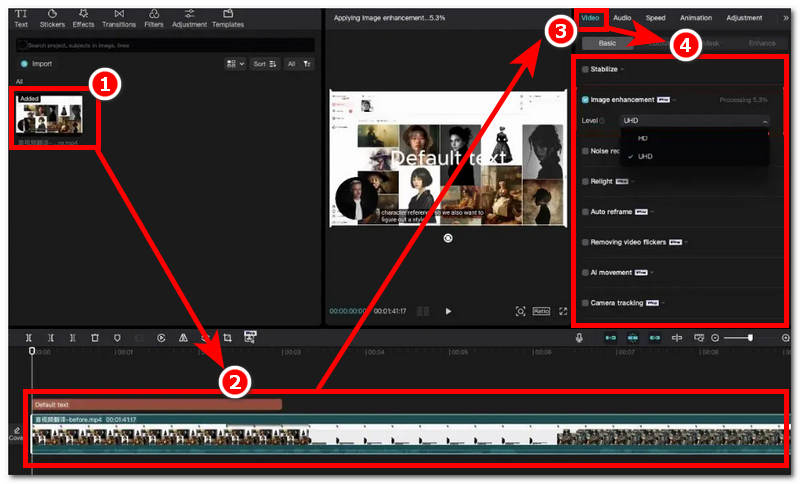
Step 3. On the right side of the CapCut application screen, click on the Video section situated in the top-right part of the screen. From there, you will be able to see all the video enhancement features available to you.
Note: Within the Video Section, you can stabilize your video, enhance the image level, reduce noise, brighten, auto-frame, remove video flicker, add AI movement, camera tracking, and more.
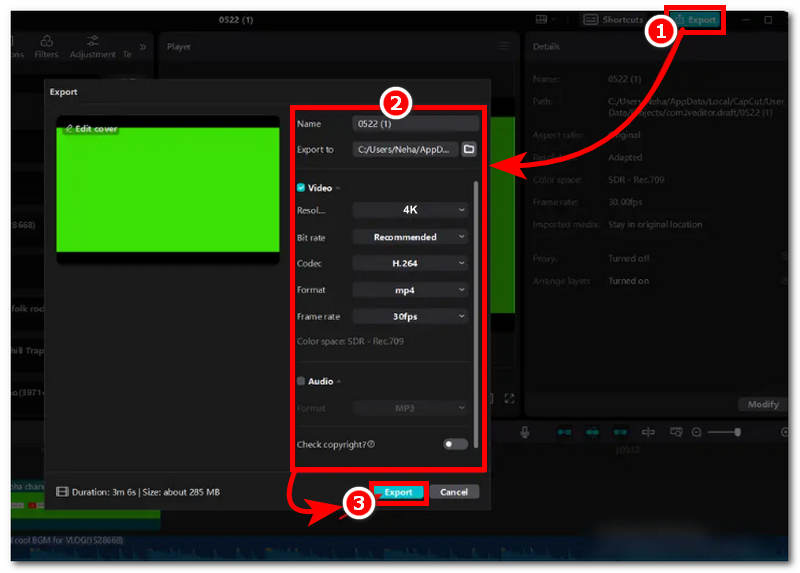
Step 4. Once you are satisfied with the enhancement features you apply to your video, proceed to export your video by clicking the Export button in the top-right part of CapCut, and from there, be sure to set your video resolution to 4K before clicking the Export button once again to start exporting it.
Pros
- A Powerful free-to-use video editing and upscaling tool for mobile, desktop, and web browsers.
- AI-powered video editing program.
- It has a variety of video editing tools, enhancement features, functions, and more.
- Supports a wide range of video file formats for seamless video online upscaling.
- Support for cloud-based storage.
- Versatile and compact video editing application.
Cons
- The free tier locks out some video upscaling features and functions.
- The output resolution when exporting video using the online tools is limited to only 2K video resolution.
- The upscaling processing speed is slow and very dependent on the video quality and file size.
- There are occasional crashes, especially when it is used at full capacity.
Part 3. Why Choose VidHex AI Video Upscaler Tool
When having problem deciding if the CapCut online video upscaler tool is the right tool for you after knowing the upscaling capabilities and overview in the above section, then in this section we will provide you with another option you may consider using when upscaling a video in a more user-friendly, functional, yet free-to-use online and lightweight video upscaler tool. VidHex AI Video Upscaler is a type of video upscaler tool that is available to use for free as a web-based tool and a software-based one.
Both the software and web versions of VidHex are integrated with an AI that allows the tool to process and upscale video at a faster pace without affecting the overall video quality. Hence, paired with its very straightforward user interface, it makes the navigation and overall usage of the tool much easier and time-saving for users, especially those who are not adept at using CapCut video enhancer tools. Thus, in this section, we listed all the things that make VidHex AI Video Upscaler Tool a better option for users to use when choosing between CapCut and VidHex below.
• Equipped with powerful AI with three AI models for video upscaling.
• It can batch process multiple videos in one go.
• It has a very straightforward and easy-to-use user interface.
• Available as a web-based and lightweight software-based tool.
• It can resolve the majority of video corruption and quality problems.
• Seamless video noise and grain removal tool.
• Does not overprocess the upscaling function.
• Fast processing and upscaling speed.
• Fast processing and upscaling speed.
Part 4. FAQs about CapCut Online Video Upscaler Tool
Is the CapCut Online Video Upscaler free?
Yes, CapCut Video Upscaling functions and capabilities are accessible and can be used for free as an AI tool across CapCut versions, but advanced features are locked behind a premium paywall.
Does AI upscaling restore lost video quality?
Yes, in a way, AI upscaling improves video sharpness, reduces video blur, and reconstructs video detail to make it appear that the video has recovered the lost video quality. This is made possible thanks to the AI that analyzes the video frame-by-frame and applies automatic adjustments to the video, making the process a lot easier and faster for restoring video quality.
Conclusion
CapCut is indeed a powerful and full-featured video editing program that makes its availability across devices to make sure that users of any kind may be able to access its service for free, especially the CapCut Video Online Upscaler tool. This guide not only reviews what CapCut’s online function is for video upscaling but also lists features and pros and cons to help readers discover the capabilities of the tool and, finally, to demonstrate how one can use the tool for seamless video upscaling. This guide also has a step-by-step guide to use CapCut's online video enhancer tool. Lastly, a quick comparison chart and overview of an alternative online video upscaler tool have been included here in this guide to serve as an alternative to CapCut when users may find CapCut more complicated or confusing to use, as VidHex is a straightforward video upscaler tool that handles upscaling almost instantaneously for user convenience.

- Upscale videos to 4K/8K with AI.
- Increase FPS for smoother videos.
- Colorize B&W old recordings.
- Brighten the low-lit footage.
- Remove noise with details retained.