


 VidHex — Enhance video quality with AI
 Upscale video to HD/4K with AI technology with no quality loss and enhance detail and sharpness.
Upscale Your Anime Videos to 4K with Top Anime Upscalers in 2026


Anime has gained substantial popularity around the world and even formed a subculture that is shared among millions of followers. Although new anime is emerging all the time, old and classic animations have been deeply rooted in minds, carrying special memories of a certain generation. However, these old anime videos are probably blurry, pixelated, or in a low resolution, due to compression, quality loss, and poor device for crafting. It is exactly today’s topic – to discover the best anime upscaler to increase the video resolution to 4K.
Contents:
At a Glance: 5 Best Anime Upscalers Compared
| Tool | Type | Price | Max Res | Anime Model | Best For |
|---|---|---|---|---|---|
| VidHex | Desktop | $31.92/mo | 8K | Dedicated | All-around speed & quality |
| Topaz Video AI | Desktop | $59/mo | 8K | (via models) | Professional restoration |
| AVCLabs | Desktop | $39.95/mo | 4K | General only | Manual control fans |
| VidHex Online Upscaler | Online | $14.90/mo | 4K | Dedicated | No-install convenience |
| Nero AI | Online / Desktop | $22.99/mo | 8K | Animation model | Anime & cartoon upscaling |
Part 1. Best 4K Anime Upscaler Software for Desktop in 2026
VidHex — Best All-Around for Speed and Quality
Best for: Professional & casual creators
VidHex AI Upscaler leverages advanced AI machine learning technology to significantly revolutionize the workflow of anime upscaling. VidHex’s abundant toolkit enables you to level up anime videos quickly and easily. You can not only enhance and upscale anime but also optimize the anime with more AI features, such as removing video noise, increasing video fps to 60 and coloring B&W animes. What's more, as a light-weight software, VidHex exhibits extraordinary convenience and cross-platform compatibility. With the simple steps below, you can upscale an anime video to 4K!
Step 1. Download VidHex and install it on your computer.
Step 2. Once it is downloaded, you can initialize VidHex and see a clear interface. Add an anime video file to VidHex.

Step 3. Select the Anime Model from the right panel. Then set the output resolution to 4K.
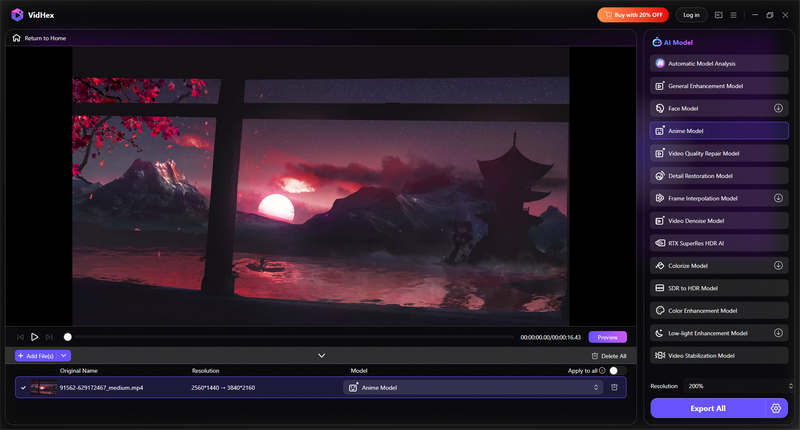
Step 4. After clicking Preview, you can easily compare the before & after video. Apparently, VidHex did a great job. If satisfied, you can export the full version.

Please note that, the processing time of true AI upscaling won't be very short. It depends on the video length, magnification you chose, the original video resolution. VidHex has cloud processing ability for VIP users, which would help you finish upscaling in cloud. You can close your program and computer at any time, instead of waiting in front of your computer.
Now, I can freely share my favorite animation with my friends! VidHex’s specific anime model can precisely detect and optimize footage in anime videos, returning an ultimate visual experience. Its intuitive interface and fast AI processing greatly save time and perfectly suit beginners like me. If you also prioritize efficiency and high quality, try VidHex immediately!
Pros
- User-friendly and intuitive interface.
- Lightning AI processing.
- A specific Anime Model to use.
- Lightweight and highly compatible.
- Multiple video formats to export.
Cons
- Only 30 frames to preview for free.
Topaz Video AI
Best for: Professional editors & film restoration
Video upscaling's heavyweight, and its anime output is also the best of the bunch -- so long as you've got the time to spare. This 3 minute clip took 4 minutes and 20 seconds to output, but it was worth it. Proteus and Artemis both produce nice outputs with anime, although you'll want to fine-tune with specific settings for each piece (anime means you will need different noise and detail parameters compared to live-action).
Topaz is the undoubted king if you're restoring an entire series, or working with an archive source. The batch workflow combined with Per-scene adjustment gives you a power that isn't on offer with any of the other software in this list.

Pros
- Best-in-class restoration for old / grainy source material
- Batch processing for series-length projects
- One-time payment, no subscription
Cons
- Slow — expect 3-5× real-time for anime upscaling
- Steep learning curve for optimal settings
- No dedicated anime mode — requires manual model tuning
AVCLabs Video Enhancer AI
Best for: Editors seeking customization
AVCLabs deals with anime fine. There's a usable denoising and sharpening available. The interface is clean, and beside upscaling you can alter brightness, saturation and contrast by yourself. The two problems:

Pros
- Support manual edits.
- Stunning upscaling effect.
- A clean and simple interface.
Cons
- Without a specific anime model.
- Slow AI upscaling.
- Outputs with a huge watermark for free trial.
Part 2. Best Online Anime AI Upscaler [No Install]
VidHex Online Video Upscaler — Zero Installation, Solid Anime Results
Best for: No-install 4K animation upscaling
VidHex Online Video Upscaler offers a quick option for those who want a quick operation with no installation. Utilizing updated AI technology, VidHex Online Video Upscaler can effectively upscale anime while preserving the original art style as the desktop software. Whether for low-resolution, blurry, or compressed anime footage, VidHex intelligently analyzes each frame and delivers high-resolution results.
Step 1. Go to VidHex AI Video Upscaler and upload an anime video with ease.
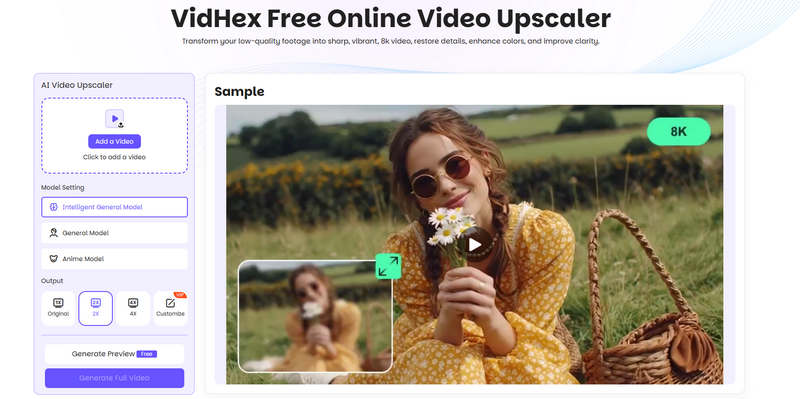
Step 2. Select the Anime Model, set the output resolution, and click Generate Preview.
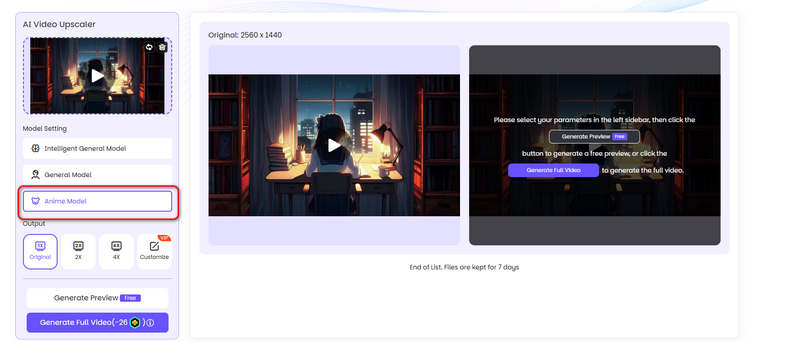
Step 3. You can see two panels and compare the before & after anime video. If satisfied, you can click Download Full Video.
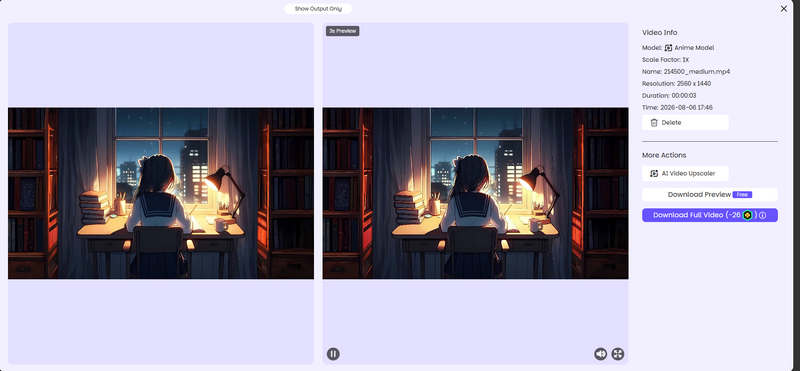
VidHex Online Video Upscaler also delivers professional-grade results without complicated steps, suitable for beginners, casual users, or content creators prioritizing efficiency.
Pros
- Lightning AI anime upscaling.
- An intuitive interface with clear instructions.
- Stunning anime upscaling effect.
- Online and highly compatible.
Cons
- Only a 3-second preview is allowed.
Nero AI Video Upscaler
Best for: Anime & cartoon upscaling
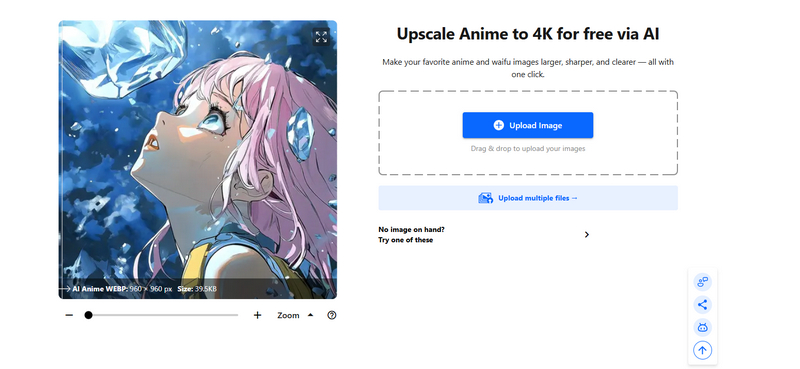
Nero AI comes with an Animation model which is meant to work on anime and cartoon content. We used it for the flat colors and clean lines and it kept the "drawn" feel rather well (compared to generic upscalers) with our sample. It also provides Face Enhancement, Restoration and a Versatile model.
Pros
- Dedicated Animation model for anime/cartoons
- Up to 8K output with frame interpolation to 120 FPS
- Batch processing and preset saving
- 7-day free trial, no credit card
Cons
- Windows-only for desktop app
- Slower than VidHex
- Subscription pricing adds up over time
Prefer a visual walkthrough? Watch the video below for more details.
Part 3. How to Choose an AI Anime Video Upscaler
Output resolution. A good anime upscaler should support high-resolution outputs, such as 4K or even 8K, while maintaining clarity.
Processing speed. Some tools, such as VidHex, allow cloud acceleration and batch processing, which are useful for upscaling entire anime series.
Hardware compatibility. In addition to speed, compatibility is also important to ensure the performance of the tool. Choose an upscaler with high hardware compatibility.
How We Tested the Best Video Upscaler
All of the desktop testing was performed on a Windows 11 PC featuring an Intel i7-13700k, 32GB RAM and a NVIDIA RTX 4070. For the on-line tests the tests were performed on the same machine over a 500Mpbs network connection. The source material was a 3 minute long 480p(720x480) scene of a 2004 anime OVA; it was low quality, heavily compressed with visible artifacts, and quite grainy, with considerable motion blur.
Each tool was analyzed on the following attributes: quality of output, speed of processing and optimization for anime & user friendliness.
FAQs About Anime Upscaling
Can AI upscalers really turn 480p anime into 4K?
Yes. Good AI upscalers like VidHex and Nero AI can generate 4K-resolution output from 480p sources. But they’re reconstructing, not restoring — the “new” pixels are AI-generated guesses.
Do I need a powerful GPU for anime upscaling?
Desktop tools benefit significantly from a dedicated GPU. A mid-range NVIDIA RTX 30-series or better is recommended. Online tools process on their servers, so your local hardware doesn’t matter. Nero works both ways — local for speed, cloud for convenience.
Is online upscaling as good as desktop?
Online tools have improved, but desktop tools still win on control and consistency. But desktop tools like VidHex and Topaz produce noticeably cleaner results, especially on motion-heavy scenes.
Does upscaling anime cause motion artifacts?
Some tools do. Frame-by-frame upscalers can produce flickering between frames, especially on fast-moving scenes. VidHex’s Anime Model handles motion consistency better than most, and Nero’s 2026 version includes real-time preview to catch these issues before export.
Conclusion
Anime upscaling is used to being time-consuming and painstaking, especially when the animation has hundreds of episodes. Fortunately, AI transforms the anime upscaling workflow and facilitates countless upscaling tools, such as VidHex AI Video Upscaler. These anime upscalers enable users to upscale anime videos to 4K fast and effortlessly. If you are an anime fan, try VidHex to upscale your beloved animation immediately! It will not disappoint you.
- Upscale videos to 4K/8K with AI.
- Increase FPS for smoother videos.
- Colorize B&W old recordings.
- Brighten the low-lit footage.
- Remove noise with details retained.


